Most queries in the introductory Language Integrated Query (LINQ) documentation use the LINQ declarative query syntax. The C# compiler translates query syntax into method calls. These method calls implement the standard query operators. They have names such as Where, Select, GroupBy, Join, Max, and Average. You call them directly by using method syntax instead of query syntax.
Query syntax and method syntax are semantically identical, but query syntax is often simpler and easier to read. You must express some queries as method calls. For example, you must use a method call to express a query that retrieves the number of elements that match a specified condition. You also must use a method call for a query that retrieves the element that has the maximum value in a source sequence. The reference documentation for the standard query operators in the System.Linq namespace generally uses method syntax. Become familiar with how to use method syntax in queries and in query expressions themselves.
Standard query operator extension methods
The following example shows a simple query expression and the semantically equivalent query written as a method-based query.
sample · csharpdocs/csharp/linq/get-started/snippets/SnippetApp/WriteLinqQueries.csMethodSyntax
namespace Linq.GetStarted;

public class WriteLinqQueries
{
    static readonly List<int> numbers = [ 5, 4, 1, 3, 9, 8, 6, 7, 2, 0 ];
    static readonly List<int> numbers1 = [ 5, 4, 1, 3, 9, 8, 6, 7, 2, 0 ];
    static readonly List<int> numbers2 = [ 15, 14, 11, 13, 19, 18, 16, 17, 12, 10 ];

    public static void MethodSyntax()
    {
        // <MethodSyntax>
        int[] numbers = [ 5, 10, 8, 3, 6, 12 ];

        //Query syntax:
        IEnumerable<int> numQuery1 =
            from num in numbers
            where num % 2 == 0
            orderby num
            select num;

        //Method syntax:
        IEnumerable<int> numQuery2 = numbers
            .Where(num => num % 2 == 0)
            .OrderBy(n => n);

        foreach (int i in numQuery1)
        {
            Console.Write(i + " ");
        }
        Console.WriteLine(System.Environment.NewLine);
        foreach (int i in numQuery2)
        {
            Console.Write(i + " ");
        }
        // </MethodSyntax>
    }

    public static void WriteLinqQueries1()
    {
        // <write_linq_queries_1>
        List<int> numbers = [ 5, 4, 1, 3, 9, 8, 6, 7, 2, 0 ];

        // The query variables can also be implicitly typed by using var

        // Query #1.
        IEnumerable<int> filteringQuery =
            from num in numbers
            where num is < 3 or > 7
            select num;

        // Query #2.
        IEnumerable<int> orderingQuery =
            from num in numbers
            where num is < 3 or > 7
            orderby num ascending
            select num;

        // Query #3.
        string[] groupingQuery = ["carrots", "cabbage", "broccoli", "beans", "barley"];
        IEnumerable<IGrouping<char, string>> queryFoodGroups =
            from item in groupingQuery
            group item by item[0];
        // </write_linq_queries_1>
    }

    public static void WriteLinqQueries2()
    {
        // <write_linq_queries_2>
        List<int> numbers1 = [ 5, 4, 1, 3, 9, 8, 6, 7, 2, 0 ];
        List<int> numbers2 = [ 15, 14, 11, 13, 19, 18, 16, 17, 12, 10 ];

        // Query #4.
        double average = numbers1.Average();

        // Query #5.
        IEnumerable<int> concatenationQuery = numbers1.Concat(numbers2);
        // </write_linq_queries_2>
    }

    public static void WriteLinqQueries3()
    {
        // <write_linq_queries_3>
        // Query #6.
        IEnumerable<int> largeNumbersQuery = numbers2.Where(c => c > 15);
        // </write_linq_queries_3>
    }

    public static void WriteLinqQueries4()
    {
        // <write_linq_queries_4>
        // var is used for convenience in these queries
        double average = numbers1.Average();
        var concatenationQuery = numbers1.Concat(numbers2);
        var largeNumbersQuery = numbers2.Where(c => c > 15);
        // </write_linq_queries_4>
    }

    public static void WriteLinqQueries5()
    {
        // <write_linq_queries_5>
        // Query #7.

        // Using a query expression with method syntax
        var numCount1 = (
            from num in numbers1
            where num is > 3 and < 7
            select num
        ).Count();

        // Better: Create a new variable to store
        // the method call result
        IEnumerable<int> numbersQuery =
            from num in numbers1
            where num is > 3 and < 7
            select num;

        var numCount2 = numbersQuery.Count();
        // </write_linq_queries_5>
    }

    public static void WriteLinqQueries5a()
    {
        // <write_linq_queries_5a>
        var numCount = numbers.Count(n => n is > 3 and < 7);
        // </write_linq_queries_5a>
    }

    public static void WriteLinqQueries5b()
    {
        // <write_linq_queries_5b>
        int numCount = numbers.Count(n => n is > 3 and < 7);
        // </write_linq_queries_5b>
    }

}
The output from the two examples is identical. The type of the query variable is the same in both forms: System.Collections.Generic.IEnumerable.
On the right side of the expression, notice that the where clause is now expressed as an instance method on the numbers object, which has a type of IEnumerable<int>. If you're familiar with the generic System.Collections.Generic.IEnumerable interface, you know that it doesn't have a Where method. However, if you invoke the IntelliSense completion list in the Visual Studio IDE, you see not only a Where method, but many other methods such as Select, SelectMany, Join, and Orderby. These methods implement the standard query operators.
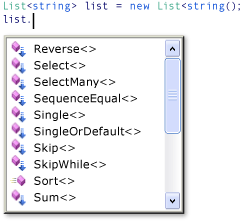
Although it looks as if System.Collections.Generic.IEnumerable includes more methods, it doesn't. The standard query operators are implemented as extension methods. Extension members "extend" an existing type; they can be called as if they were members on the type. The standard query operators extend System.Collections.Generic.IEnumerable, and that's why you can write numbers.Where(...). You bring extensions into scope with using directives before calling them.
For more information about extension members, see Extension members. For more information about standard query operators, see Standard Query Operators Overview (C#). Some LINQ providers, such as Entity Framework and LINQ to XML, implement their own standard query operators and extension members for other types besides System.Collections.Generic.IEnumerable.
Lambda expressions
In the preceding example, the conditional expression (num % 2 == 0) is passed as an in-line argument to the System.Linq.Enumerable.Where method: Where(num => num % 2 == 0). This inline expression is a lambda expression. It's a convenient way to write code that would otherwise have to be written in more cumbersome form. The num on the left of the operator is the input variable, which corresponds to num in the query expression. The compiler can infer the type of num because it knows that numbers is a generic System.Collections.Generic.IEnumerable type. The body of the lambda is the same as the expression in query syntax or in any other C# expression or statement. It can include method calls and other complex logic. The return value is the expression result. You can only express certain queries in method syntax, and some of those queries require lambda expressions. Lambda expressions are a powerful and flexible tool in your LINQ toolbox.
Composability of queries
In the preceding code example, the System.Linq.Enumerable.OrderBy method is invoked by using the dot operator on the call to Where. Where produces a filtered sequence, and then Orderby sorts the sequence produced by Where. Because queries return an IEnumerable, you compose them in method syntax by chaining the method calls together. The compiler does this composition when you write queries using query syntax. Because a query variable doesn't store the results of the query, you can modify it or use it as the basis for a new query at any time, even after you execute it.
The following examples demonstrate some basic LINQ queries by using each approach listed previously.
Example - query syntax
Write most queries with query syntax to create query expressions. The following example shows three query expressions. The first query expression demonstrates how to filter or restrict results by applying conditions with a where clause. It returns all elements in the source sequence whose values are greater than 7 or less than 3. The second expression demonstrates how to order the returned results. The third expression demonstrates how to group results according to a key. This query returns two groups based on the first letter of the word.
sample · csharpdocs/csharp/linq/get-started/snippets/SnippetApp/WriteLinqQueries.cswrite_linq_queries_1
namespace Linq.GetStarted;

public class WriteLinqQueries
{
    static readonly List<int> numbers = [ 5, 4, 1, 3, 9, 8, 6, 7, 2, 0 ];
    static readonly List<int> numbers1 = [ 5, 4, 1, 3, 9, 8, 6, 7, 2, 0 ];
    static readonly List<int> numbers2 = [ 15, 14, 11, 13, 19, 18, 16, 17, 12, 10 ];

    public static void MethodSyntax()
    {
        // <MethodSyntax>
        int[] numbers = [ 5, 10, 8, 3, 6, 12 ];

        //Query syntax:
        IEnumerable<int> numQuery1 =
            from num in numbers
            where num % 2 == 0
            orderby num
            select num;

        //Method syntax:
        IEnumerable<int> numQuery2 = numbers
            .Where(num => num % 2 == 0)
            .OrderBy(n => n);

        foreach (int i in numQuery1)
        {
            Console.Write(i + " ");
        }
        Console.WriteLine(System.Environment.NewLine);
        foreach (int i in numQuery2)
        {
            Console.Write(i + " ");
        }
        // </MethodSyntax>
    }

    public static void WriteLinqQueries1()
    {
        // <write_linq_queries_1>
        List<int> numbers = [ 5, 4, 1, 3, 9, 8, 6, 7, 2, 0 ];

        // The query variables can also be implicitly typed by using var

        // Query #1.
        IEnumerable<int> filteringQuery =
            from num in numbers
            where num is < 3 or > 7
            select num;

        // Query #2.
        IEnumerable<int> orderingQuery =
            from num in numbers
            where num is < 3 or > 7
            orderby num ascending
            select num;

        // Query #3.
        string[] groupingQuery = ["carrots", "cabbage", "broccoli", "beans", "barley"];
        IEnumerable<IGrouping<char, string>> queryFoodGroups =
            from item in groupingQuery
            group item by item[0];
        // </write_linq_queries_1>
    }

    public static void WriteLinqQueries2()
    {
        // <write_linq_queries_2>
        List<int> numbers1 = [ 5, 4, 1, 3, 9, 8, 6, 7, 2, 0 ];
        List<int> numbers2 = [ 15, 14, 11, 13, 19, 18, 16, 17, 12, 10 ];

        // Query #4.
        double average = numbers1.Average();

        // Query #5.
        IEnumerable<int> concatenationQuery = numbers1.Concat(numbers2);
        // </write_linq_queries_2>
    }

    public static void WriteLinqQueries3()
    {
        // <write_linq_queries_3>
        // Query #6.
        IEnumerable<int> largeNumbersQuery = numbers2.Where(c => c > 15);
        // </write_linq_queries_3>
    }

    public static void WriteLinqQueries4()
    {
        // <write_linq_queries_4>
        // var is used for convenience in these queries
        double average = numbers1.Average();
        var concatenationQuery = numbers1.Concat(numbers2);
        var largeNumbersQuery = numbers2.Where(c => c > 15);
        // </write_linq_queries_4>
    }

    public static void WriteLinqQueries5()
    {
        // <write_linq_queries_5>
        // Query #7.

        // Using a query expression with method syntax
        var numCount1 = (
            from num in numbers1
            where num is > 3 and < 7
            select num
        ).Count();

        // Better: Create a new variable to store
        // the method call result
        IEnumerable<int> numbersQuery =
            from num in numbers1
            where num is > 3 and < 7
            select num;

        var numCount2 = numbersQuery.Count();
        // </write_linq_queries_5>
    }

    public static void WriteLinqQueries5a()
    {
        // <write_linq_queries_5a>
        var numCount = numbers.Count(n => n is > 3 and < 7);
        // </write_linq_queries_5a>
    }

    public static void WriteLinqQueries5b()
    {
        // <write_linq_queries_5b>
        int numCount = numbers.Count(n => n is > 3 and < 7);
        // </write_linq_queries_5b>
    }

}
The type of the queries is System.Collections.Generic.IEnumerable. All of these queries can be written using var as shown in the following example:
var query = from num in numbers...
In each previous example, the queries don't actually execute until you iterate over the query variable in a foreach statement or other statement.
Example - method syntax
You must express some query operations as a method call. The most common such methods are those methods that return singleton numeric values, such as System.Linq.Enumerable.Sum, System.Linq.Enumerable.Max, System.Linq.Enumerable.Min, System.Linq.Enumerable.Average, and so on. Call these methods last in any query because they return a single value and can't serve as the source for more query operations. The following example shows a method call in a query expression:
sample · csharpdocs/csharp/linq/get-started/snippets/SnippetApp/WriteLinqQueries.cswrite_linq_queries_2
namespace Linq.GetStarted;

public class WriteLinqQueries
{
    static readonly List<int> numbers = [ 5, 4, 1, 3, 9, 8, 6, 7, 2, 0 ];
    static readonly List<int> numbers1 = [ 5, 4, 1, 3, 9, 8, 6, 7, 2, 0 ];
    static readonly List<int> numbers2 = [ 15, 14, 11, 13, 19, 18, 16, 17, 12, 10 ];

    public static void MethodSyntax()
    {
        // <MethodSyntax>
        int[] numbers = [ 5, 10, 8, 3, 6, 12 ];

        //Query syntax:
        IEnumerable<int> numQuery1 =
            from num in numbers
            where num % 2 == 0
            orderby num
            select num;

        //Method syntax:
        IEnumerable<int> numQuery2 = numbers
            .Where(num => num % 2 == 0)
            .OrderBy(n => n);

        foreach (int i in numQuery1)
        {
            Console.Write(i + " ");
        }
        Console.WriteLine(System.Environment.NewLine);
        foreach (int i in numQuery2)
        {
            Console.Write(i + " ");
        }
        // </MethodSyntax>
    }

    public static void WriteLinqQueries1()
    {
        // <write_linq_queries_1>
        List<int> numbers = [ 5, 4, 1, 3, 9, 8, 6, 7, 2, 0 ];

        // The query variables can also be implicitly typed by using var

        // Query #1.
        IEnumerable<int> filteringQuery =
            from num in numbers
            where num is < 3 or > 7
            select num;

        // Query #2.
        IEnumerable<int> orderingQuery =
            from num in numbers
            where num is < 3 or > 7
            orderby num ascending
            select num;

        // Query #3.
        string[] groupingQuery = ["carrots", "cabbage", "broccoli", "beans", "barley"];
        IEnumerable<IGrouping<char, string>> queryFoodGroups =
            from item in groupingQuery
            group item by item[0];
        // </write_linq_queries_1>
    }

    public static void WriteLinqQueries2()
    {
        // <write_linq_queries_2>
        List<int> numbers1 = [ 5, 4, 1, 3, 9, 8, 6, 7, 2, 0 ];
        List<int> numbers2 = [ 15, 14, 11, 13, 19, 18, 16, 17, 12, 10 ];

        // Query #4.
        double average = numbers1.Average();

        // Query #5.
        IEnumerable<int> concatenationQuery = numbers1.Concat(numbers2);
        // </write_linq_queries_2>
    }

    public static void WriteLinqQueries3()
    {
        // <write_linq_queries_3>
        // Query #6.
        IEnumerable<int> largeNumbersQuery = numbers2.Where(c => c > 15);
        // </write_linq_queries_3>
    }

    public static void WriteLinqQueries4()
    {
        // <write_linq_queries_4>
        // var is used for convenience in these queries
        double average = numbers1.Average();
        var concatenationQuery = numbers1.Concat(numbers2);
        var largeNumbersQuery = numbers2.Where(c => c > 15);
        // </write_linq_queries_4>
    }

    public static void WriteLinqQueries5()
    {
        // <write_linq_queries_5>
        // Query #7.

        // Using a query expression with method syntax
        var numCount1 = (
            from num in numbers1
            where num is > 3 and < 7
            select num
        ).Count();

        // Better: Create a new variable to store
        // the method call result
        IEnumerable<int> numbersQuery =
            from num in numbers1
            where num is > 3 and < 7
            select num;

        var numCount2 = numbersQuery.Count();
        // </write_linq_queries_5>
    }

    public static void WriteLinqQueries5a()
    {
        // <write_linq_queries_5a>
        var numCount = numbers.Count(n => n is > 3 and < 7);
        // </write_linq_queries_5a>
    }

    public static void WriteLinqQueries5b()
    {
        // <write_linq_queries_5b>
        int numCount = numbers.Count(n => n is > 3 and < 7);
        // </write_linq_queries_5b>
    }

}
If the method has System.Action or System.Func parameters, provide these arguments in the form of a lambda expression, as shown in the following example:
sample · csharpdocs/csharp/linq/get-started/snippets/SnippetApp/WriteLinqQueries.cswrite_linq_queries_3
namespace Linq.GetStarted;

public class WriteLinqQueries
{
    static readonly List<int> numbers = [ 5, 4, 1, 3, 9, 8, 6, 7, 2, 0 ];
    static readonly List<int> numbers1 = [ 5, 4, 1, 3, 9, 8, 6, 7, 2, 0 ];
    static readonly List<int> numbers2 = [ 15, 14, 11, 13, 19, 18, 16, 17, 12, 10 ];

    public static void MethodSyntax()
    {
        // <MethodSyntax>
        int[] numbers = [ 5, 10, 8, 3, 6, 12 ];

        //Query syntax:
        IEnumerable<int> numQuery1 =
            from num in numbers
            where num % 2 == 0
            orderby num
            select num;

        //Method syntax:
        IEnumerable<int> numQuery2 = numbers
            .Where(num => num % 2 == 0)
            .OrderBy(n => n);

        foreach (int i in numQuery1)
        {
            Console.Write(i + " ");
        }
        Console.WriteLine(System.Environment.NewLine);
        foreach (int i in numQuery2)
        {
            Console.Write(i + " ");
        }
        // </MethodSyntax>
    }

    public static void WriteLinqQueries1()
    {
        // <write_linq_queries_1>
        List<int> numbers = [ 5, 4, 1, 3, 9, 8, 6, 7, 2, 0 ];

        // The query variables can also be implicitly typed by using var

        // Query #1.
        IEnumerable<int> filteringQuery =
            from num in numbers
            where num is < 3 or > 7
            select num;

        // Query #2.
        IEnumerable<int> orderingQuery =
            from num in numbers
            where num is < 3 or > 7
            orderby num ascending
            select num;

        // Query #3.
        string[] groupingQuery = ["carrots", "cabbage", "broccoli", "beans", "barley"];
        IEnumerable<IGrouping<char, string>> queryFoodGroups =
            from item in groupingQuery
            group item by item[0];
        // </write_linq_queries_1>
    }

    public static void WriteLinqQueries2()
    {
        // <write_linq_queries_2>
        List<int> numbers1 = [ 5, 4, 1, 3, 9, 8, 6, 7, 2, 0 ];
        List<int> numbers2 = [ 15, 14, 11, 13, 19, 18, 16, 17, 12, 10 ];

        // Query #4.
        double average = numbers1.Average();

        // Query #5.
        IEnumerable<int> concatenationQuery = numbers1.Concat(numbers2);
        // </write_linq_queries_2>
    }

    public static void WriteLinqQueries3()
    {
        // <write_linq_queries_3>
        // Query #6.
        IEnumerable<int> largeNumbersQuery = numbers2.Where(c => c > 15);
        // </write_linq_queries_3>
    }

    public static void WriteLinqQueries4()
    {
        // <write_linq_queries_4>
        // var is used for convenience in these queries
        double average = numbers1.Average();
        var concatenationQuery = numbers1.Concat(numbers2);
        var largeNumbersQuery = numbers2.Where(c => c > 15);
        // </write_linq_queries_4>
    }

    public static void WriteLinqQueries5()
    {
        // <write_linq_queries_5>
        // Query #7.

        // Using a query expression with method syntax
        var numCount1 = (
            from num in numbers1
            where num is > 3 and < 7
            select num
        ).Count();

        // Better: Create a new variable to store
        // the method call result
        IEnumerable<int> numbersQuery =
            from num in numbers1
            where num is > 3 and < 7
            select num;

        var numCount2 = numbersQuery.Count();
        // </write_linq_queries_5>
    }

    public static void WriteLinqQueries5a()
    {
        // <write_linq_queries_5a>
        var numCount = numbers.Count(n => n is > 3 and < 7);
        // </write_linq_queries_5a>
    }

    public static void WriteLinqQueries5b()
    {
        // <write_linq_queries_5b>
        int numCount = numbers.Count(n => n is > 3 and < 7);
        // </write_linq_queries_5b>
    }

}
In the previous queries, only Query #4 executes immediately because it returns a single value, and not a generic System.Collections.Generic.IEnumerable collection. The method itself uses foreach or similar code in order to compute its value.
You can write each of the previous queries by using implicit typing with var, as shown in the following example:
sample · csharpdocs/csharp/linq/get-started/snippets/SnippetApp/WriteLinqQueries.cswrite_linq_queries_4
namespace Linq.GetStarted;

public class WriteLinqQueries
{
    static readonly List<int> numbers = [ 5, 4, 1, 3, 9, 8, 6, 7, 2, 0 ];
    static readonly List<int> numbers1 = [ 5, 4, 1, 3, 9, 8, 6, 7, 2, 0 ];
    static readonly List<int> numbers2 = [ 15, 14, 11, 13, 19, 18, 16, 17, 12, 10 ];

    public static void MethodSyntax()
    {
        // <MethodSyntax>
        int[] numbers = [ 5, 10, 8, 3, 6, 12 ];

        //Query syntax:
        IEnumerable<int> numQuery1 =
            from num in numbers
            where num % 2 == 0
            orderby num
            select num;

        //Method syntax:
        IEnumerable<int> numQuery2 = numbers
            .Where(num => num % 2 == 0)
            .OrderBy(n => n);

        foreach (int i in numQuery1)
        {
            Console.Write(i + " ");
        }
        Console.WriteLine(System.Environment.NewLine);
        foreach (int i in numQuery2)
        {
            Console.Write(i + " ");
        }
        // </MethodSyntax>
    }

    public static void WriteLinqQueries1()
    {
        // <write_linq_queries_1>
        List<int> numbers = [ 5, 4, 1, 3, 9, 8, 6, 7, 2, 0 ];

        // The query variables can also be implicitly typed by using var

        // Query #1.
        IEnumerable<int> filteringQuery =
            from num in numbers
            where num is < 3 or > 7
            select num;

        // Query #2.
        IEnumerable<int> orderingQuery =
            from num in numbers
            where num is < 3 or > 7
            orderby num ascending
            select num;

        // Query #3.
        string[] groupingQuery = ["carrots", "cabbage", "broccoli", "beans", "barley"];
        IEnumerable<IGrouping<char, string>> queryFoodGroups =
            from item in groupingQuery
            group item by item[0];
        // </write_linq_queries_1>
    }

    public static void WriteLinqQueries2()
    {
        // <write_linq_queries_2>
        List<int> numbers1 = [ 5, 4, 1, 3, 9, 8, 6, 7, 2, 0 ];
        List<int> numbers2 = [ 15, 14, 11, 13, 19, 18, 16, 17, 12, 10 ];

        // Query #4.
        double average = numbers1.Average();

        // Query #5.
        IEnumerable<int> concatenationQuery = numbers1.Concat(numbers2);
        // </write_linq_queries_2>
    }

    public static void WriteLinqQueries3()
    {
        // <write_linq_queries_3>
        // Query #6.
        IEnumerable<int> largeNumbersQuery = numbers2.Where(c => c > 15);
        // </write_linq_queries_3>
    }

    public static void WriteLinqQueries4()
    {
        // <write_linq_queries_4>
        // var is used for convenience in these queries
        double average = numbers1.Average();
        var concatenationQuery = numbers1.Concat(numbers2);
        var largeNumbersQuery = numbers2.Where(c => c > 15);
        // </write_linq_queries_4>
    }

    public static void WriteLinqQueries5()
    {
        // <write_linq_queries_5>
        // Query #7.

        // Using a query expression with method syntax
        var numCount1 = (
            from num in numbers1
            where num is > 3 and < 7
            select num
        ).Count();

        // Better: Create a new variable to store
        // the method call result
        IEnumerable<int> numbersQuery =
            from num in numbers1
            where num is > 3 and < 7
            select num;

        var numCount2 = numbersQuery.Count();
        // </write_linq_queries_5>
    }

    public static void WriteLinqQueries5a()
    {
        // <write_linq_queries_5a>
        var numCount = numbers.Count(n => n is > 3 and < 7);
        // </write_linq_queries_5a>
    }

    public static void WriteLinqQueries5b()
    {
        // <write_linq_queries_5b>
        int numCount = numbers.Count(n => n is > 3 and < 7);
        // </write_linq_queries_5b>
    }

}Example - mixed query and method syntax
This example shows how to use method syntax on the results of a query clause. Enclose the query expression in parentheses, and then apply the dot operator and call the method. In the following example, query #7 returns a count of the numbers whose value is between 3 and 7.
sample · csharpdocs/csharp/linq/get-started/snippets/SnippetApp/WriteLinqQueries.cswrite_linq_queries_5
namespace Linq.GetStarted;

public class WriteLinqQueries
{
    static readonly List<int> numbers = [ 5, 4, 1, 3, 9, 8, 6, 7, 2, 0 ];
    static readonly List<int> numbers1 = [ 5, 4, 1, 3, 9, 8, 6, 7, 2, 0 ];
    static readonly List<int> numbers2 = [ 15, 14, 11, 13, 19, 18, 16, 17, 12, 10 ];

    public static void MethodSyntax()
    {
        // <MethodSyntax>
        int[] numbers = [ 5, 10, 8, 3, 6, 12 ];

        //Query syntax:
        IEnumerable<int> numQuery1 =
            from num in numbers
            where num % 2 == 0
            orderby num
            select num;

        //Method syntax:
        IEnumerable<int> numQuery2 = numbers
            .Where(num => num % 2 == 0)
            .OrderBy(n => n);

        foreach (int i in numQuery1)
        {
            Console.Write(i + " ");
        }
        Console.WriteLine(System.Environment.NewLine);
        foreach (int i in numQuery2)
        {
            Console.Write(i + " ");
        }
        // </MethodSyntax>
    }

    public static void WriteLinqQueries1()
    {
        // <write_linq_queries_1>
        List<int> numbers = [ 5, 4, 1, 3, 9, 8, 6, 7, 2, 0 ];

        // The query variables can also be implicitly typed by using var

        // Query #1.
        IEnumerable<int> filteringQuery =
            from num in numbers
            where num is < 3 or > 7
            select num;

        // Query #2.
        IEnumerable<int> orderingQuery =
            from num in numbers
            where num is < 3 or > 7
            orderby num ascending
            select num;

        // Query #3.
        string[] groupingQuery = ["carrots", "cabbage", "broccoli", "beans", "barley"];
        IEnumerable<IGrouping<char, string>> queryFoodGroups =
            from item in groupingQuery
            group item by item[0];
        // </write_linq_queries_1>
    }

    public static void WriteLinqQueries2()
    {
        // <write_linq_queries_2>
        List<int> numbers1 = [ 5, 4, 1, 3, 9, 8, 6, 7, 2, 0 ];
        List<int> numbers2 = [ 15, 14, 11, 13, 19, 18, 16, 17, 12, 10 ];

        // Query #4.
        double average = numbers1.Average();

        // Query #5.
        IEnumerable<int> concatenationQuery = numbers1.Concat(numbers2);
        // </write_linq_queries_2>
    }

    public static void WriteLinqQueries3()
    {
        // <write_linq_queries_3>
        // Query #6.
        IEnumerable<int> largeNumbersQuery = numbers2.Where(c => c > 15);
        // </write_linq_queries_3>
    }

    public static void WriteLinqQueries4()
    {
        // <write_linq_queries_4>
        // var is used for convenience in these queries
        double average = numbers1.Average();
        var concatenationQuery = numbers1.Concat(numbers2);
        var largeNumbersQuery = numbers2.Where(c => c > 15);
        // </write_linq_queries_4>
    }

    public static void WriteLinqQueries5()
    {
        // <write_linq_queries_5>
        // Query #7.

        // Using a query expression with method syntax
        var numCount1 = (
            from num in numbers1
            where num is > 3 and < 7
            select num
        ).Count();

        // Better: Create a new variable to store
        // the method call result
        IEnumerable<int> numbersQuery =
            from num in numbers1
            where num is > 3 and < 7
            select num;

        var numCount2 = numbersQuery.Count();
        // </write_linq_queries_5>
    }

    public static void WriteLinqQueries5a()
    {
        // <write_linq_queries_5a>
        var numCount = numbers.Count(n => n is > 3 and < 7);
        // </write_linq_queries_5a>
    }

    public static void WriteLinqQueries5b()
    {
        // <write_linq_queries_5b>
        int numCount = numbers.Count(n => n is > 3 and < 7);
        // </write_linq_queries_5b>
    }

}
Because Query #7 returns a single value and not a collection, the query executes immediately.
You can write the previous query by using implicit typing with var, as follows:
var numCount = (from num in numbers...You can write it in method syntax as follows:
sample · csharpdocs/csharp/linq/get-started/snippets/SnippetApp/WriteLinqQueries.cswrite_linq_queries_5a
namespace Linq.GetStarted;

public class WriteLinqQueries
{
    static readonly List<int> numbers = [ 5, 4, 1, 3, 9, 8, 6, 7, 2, 0 ];
    static readonly List<int> numbers1 = [ 5, 4, 1, 3, 9, 8, 6, 7, 2, 0 ];
    static readonly List<int> numbers2 = [ 15, 14, 11, 13, 19, 18, 16, 17, 12, 10 ];

    public static void MethodSyntax()
    {
        // <MethodSyntax>
        int[] numbers = [ 5, 10, 8, 3, 6, 12 ];

        //Query syntax:
        IEnumerable<int> numQuery1 =
            from num in numbers
            where num % 2 == 0
            orderby num
            select num;

        //Method syntax:
        IEnumerable<int> numQuery2 = numbers
            .Where(num => num % 2 == 0)
            .OrderBy(n => n);

        foreach (int i in numQuery1)
        {
            Console.Write(i + " ");
        }
        Console.WriteLine(System.Environment.NewLine);
        foreach (int i in numQuery2)
        {
            Console.Write(i + " ");
        }
        // </MethodSyntax>
    }

    public static void WriteLinqQueries1()
    {
        // <write_linq_queries_1>
        List<int> numbers = [ 5, 4, 1, 3, 9, 8, 6, 7, 2, 0 ];

        // The query variables can also be implicitly typed by using var

        // Query #1.
        IEnumerable<int> filteringQuery =
            from num in numbers
            where num is < 3 or > 7
            select num;

        // Query #2.
        IEnumerable<int> orderingQuery =
            from num in numbers
            where num is < 3 or > 7
            orderby num ascending
            select num;

        // Query #3.
        string[] groupingQuery = ["carrots", "cabbage", "broccoli", "beans", "barley"];
        IEnumerable<IGrouping<char, string>> queryFoodGroups =
            from item in groupingQuery
            group item by item[0];
        // </write_linq_queries_1>
    }

    public static void WriteLinqQueries2()
    {
        // <write_linq_queries_2>
        List<int> numbers1 = [ 5, 4, 1, 3, 9, 8, 6, 7, 2, 0 ];
        List<int> numbers2 = [ 15, 14, 11, 13, 19, 18, 16, 17, 12, 10 ];

        // Query #4.
        double average = numbers1.Average();

        // Query #5.
        IEnumerable<int> concatenationQuery = numbers1.Concat(numbers2);
        // </write_linq_queries_2>
    }

    public static void WriteLinqQueries3()
    {
        // <write_linq_queries_3>
        // Query #6.
        IEnumerable<int> largeNumbersQuery = numbers2.Where(c => c > 15);
        // </write_linq_queries_3>
    }

    public static void WriteLinqQueries4()
    {
        // <write_linq_queries_4>
        // var is used for convenience in these queries
        double average = numbers1.Average();
        var concatenationQuery = numbers1.Concat(numbers2);
        var largeNumbersQuery = numbers2.Where(c => c > 15);
        // </write_linq_queries_4>
    }

    public static void WriteLinqQueries5()
    {
        // <write_linq_queries_5>
        // Query #7.

        // Using a query expression with method syntax
        var numCount1 = (
            from num in numbers1
            where num is > 3 and < 7
            select num
        ).Count();

        // Better: Create a new variable to store
        // the method call result
        IEnumerable<int> numbersQuery =
            from num in numbers1
            where num is > 3 and < 7
            select num;

        var numCount2 = numbersQuery.Count();
        // </write_linq_queries_5>
    }

    public static void WriteLinqQueries5a()
    {
        // <write_linq_queries_5a>
        var numCount = numbers.Count(n => n is > 3 and < 7);
        // </write_linq_queries_5a>
    }

    public static void WriteLinqQueries5b()
    {
        // <write_linq_queries_5b>
        int numCount = numbers.Count(n => n is > 3 and < 7);
        // </write_linq_queries_5b>
    }

}
You can write it by using explicit typing, as follows:
sample · csharpdocs/csharp/linq/get-started/snippets/SnippetApp/WriteLinqQueries.cswrite_linq_queries_5b
namespace Linq.GetStarted;

public class WriteLinqQueries
{
    static readonly List<int> numbers = [ 5, 4, 1, 3, 9, 8, 6, 7, 2, 0 ];
    static readonly List<int> numbers1 = [ 5, 4, 1, 3, 9, 8, 6, 7, 2, 0 ];
    static readonly List<int> numbers2 = [ 15, 14, 11, 13, 19, 18, 16, 17, 12, 10 ];

    public static void MethodSyntax()
    {
        // <MethodSyntax>
        int[] numbers = [ 5, 10, 8, 3, 6, 12 ];

        //Query syntax:
        IEnumerable<int> numQuery1 =
            from num in numbers
            where num % 2 == 0
            orderby num
            select num;

        //Method syntax:
        IEnumerable<int> numQuery2 = numbers
            .Where(num => num % 2 == 0)
            .OrderBy(n => n);

        foreach (int i in numQuery1)
        {
            Console.Write(i + " ");
        }
        Console.WriteLine(System.Environment.NewLine);
        foreach (int i in numQuery2)
        {
            Console.Write(i + " ");
        }
        // </MethodSyntax>
    }

    public static void WriteLinqQueries1()
    {
        // <write_linq_queries_1>
        List<int> numbers = [ 5, 4, 1, 3, 9, 8, 6, 7, 2, 0 ];

        // The query variables can also be implicitly typed by using var

        // Query #1.
        IEnumerable<int> filteringQuery =
            from num in numbers
            where num is < 3 or > 7
            select num;

        // Query #2.
        IEnumerable<int> orderingQuery =
            from num in numbers
            where num is < 3 or > 7
            orderby num ascending
            select num;

        // Query #3.
        string[] groupingQuery = ["carrots", "cabbage", "broccoli", "beans", "barley"];
        IEnumerable<IGrouping<char, string>> queryFoodGroups =
            from item in groupingQuery
            group item by item[0];
        // </write_linq_queries_1>
    }

    public static void WriteLinqQueries2()
    {
        // <write_linq_queries_2>
        List<int> numbers1 = [ 5, 4, 1, 3, 9, 8, 6, 7, 2, 0 ];
        List<int> numbers2 = [ 15, 14, 11, 13, 19, 18, 16, 17, 12, 10 ];

        // Query #4.
        double average = numbers1.Average();

        // Query #5.
        IEnumerable<int> concatenationQuery = numbers1.Concat(numbers2);
        // </write_linq_queries_2>
    }

    public static void WriteLinqQueries3()
    {
        // <write_linq_queries_3>
        // Query #6.
        IEnumerable<int> largeNumbersQuery = numbers2.Where(c => c > 15);
        // </write_linq_queries_3>
    }

    public static void WriteLinqQueries4()
    {
        // <write_linq_queries_4>
        // var is used for convenience in these queries
        double average = numbers1.Average();
        var concatenationQuery = numbers1.Concat(numbers2);
        var largeNumbersQuery = numbers2.Where(c => c > 15);
        // </write_linq_queries_4>
    }

    public static void WriteLinqQueries5()
    {
        // <write_linq_queries_5>
        // Query #7.

        // Using a query expression with method syntax
        var numCount1 = (
            from num in numbers1
            where num is > 3 and < 7
            select num
        ).Count();

        // Better: Create a new variable to store
        // the method call result
        IEnumerable<int> numbersQuery =
            from num in numbers1
            where num is > 3 and < 7
            select num;

        var numCount2 = numbersQuery.Count();
        // </write_linq_queries_5>
    }

    public static void WriteLinqQueries5a()
    {
        // <write_linq_queries_5a>
        var numCount = numbers.Count(n => n is > 3 and < 7);
        // </write_linq_queries_5a>
    }

    public static void WriteLinqQueries5b()
    {
        // <write_linq_queries_5b>
        int numCount = numbers.Count(n => n is > 3 and < 7);
        // </write_linq_queries_5b>
    }

}Dynamically specify predicate filters at run time
In some cases, you don't know until run time how many predicates you have to apply to source elements in the where clause. One way to dynamically specify multiple predicate filters is to use the System.Linq.Enumerable.Contains method, as shown in the following example. The query returns different results based on the value of id when the query is executed.
sample · csharpdocs/csharp/linq/get-started/snippets/SnippetApp/RuntimeFiltering.csruntime_filtering_1
using static LinqSamples.Student;

namespace LinqSamples;

public static class RuntimeFiltering
{
    public static void RuntimeFiltering1()
    {
        // <runtime_filtering_1>
        int[] ids = [ 111, 114, 112 ];

        var queryNames = from student in students
                         where ids.Contains(student.ID)
                         select new
                         {
                             student.LastName,
                             student.ID
                         };

        foreach (var name in queryNames)
        {
            Console.WriteLine($"{name.LastName}: {name.ID}");
        }

        /* Output:
            Garcia: 114
            O'Donnell: 112
            Omelchenko: 111
         */

        // Change the ids.
        ids = [ 122, 117, 120, 115 ];

        // The query will now return different results
        foreach (var name in queryNames)
        {
            Console.WriteLine($"{name.LastName}: {name.ID}");
        }

        /* Output:
            Adams: 120
            Feng: 117
            Garcia: 115
            Tucker: 122
         */
        // </runtime_filtering_1>
    }

    public static void RuntimeFiltering2()
    {
        // <runtime_filtering_2>
        void FilterByYearType(bool oddYear)
        {
            IEnumerable<Student> studentQuery = oddYear
                ? (from student in students
                   where student.Year is GradeLevel.FirstYear or GradeLevel.ThirdYear
                   select student)
                : (from student in students
                   where student.Year is GradeLevel.SecondYear or GradeLevel.FourthYear
                   select student);
            var descr = oddYear ? "odd" : "even";
            Console.WriteLine($"The following students are at an {descr} year level:");
            foreach (Student name in studentQuery)
            {
                Console.WriteLine($"{name.LastName}: {name.ID}");
            }
        }

        FilterByYearType(true);

        /* Output:
            The following students are at an odd year level:
            Fakhouri: 116
            Feng: 117
            Garcia: 115
            Mortensen: 113
            Tucker: 119
            Tucker: 122
         */

        FilterByYearType(false);

        /* Output:
            The following students are at an even year level:
            Adams: 120
            Garcia: 114
            Garcia: 118
            O'Donnell: 112
            Omelchenko: 111
            Zabokritski: 121
         */
        // </runtime_filtering_2>
    }
}sample · csharpdocs/csharp/linq/get-started/snippets/SnippetApp/DataSources.csbasics_datasource
namespace Linq.GetStarted;

// <basics_datasource>
record City(string Name, long Population);
record Country(string Name, double Area, long Population, List<City> Cities);
record Product(string Name, string Category);
// </basics_datasource>

class Student
{
    public string FirstName { get; set; }
    public string LastName { get; set; }
    public int ID { get; set; }
    public GradeLevel? Year { get; set; }
    public List<int> ExamScores { get; set; }

    public Student(string FirstName, string LastName, int ID, GradeLevel Year, List<int> ExamScores)
    {
        this.FirstName = FirstName;
        this.LastName = LastName;
        this.ID = ID;
        this.Year = Year;
        this.ExamScores = ExamScores;
    }

    public Student(string FirstName, string LastName, int StudentID, List<int>? ExamScores = null)
    {
        this.FirstName = FirstName;
        this.LastName = LastName;
        ID = StudentID;
        this.ExamScores = ExamScores ?? [];
    }

    public static List<Student> students =
    [
        new(
            FirstName: "Terry", LastName: "Adams", ID: 120,
            Year: GradeLevel.SecondYear,
            ExamScores: [99, 82, 81, 79]
        ),
        new(
            "Fadi", "Fakhouri", 116,
            GradeLevel.ThirdYear,
            [99, 86, 90, 94]
        ),
        new(
            "Hanying", "Feng", 117,
            GradeLevel.FirstYear,
            [93, 92, 80, 87]
        ),
        new(
            "Cesar", "Garcia", 114,
            GradeLevel.FourthYear,
            [97, 89, 85, 82]
        ),
        new(
            "Debra", "Garcia", 115,
            GradeLevel.ThirdYear,
            [35, 72, 91, 70]
        ),
        new(
            "Hugo", "Garcia", 118,
            GradeLevel.SecondYear,
            [92, 90, 83, 78]
        ),
        new(
            "Sven", "Mortensen", 113,
            GradeLevel.FirstYear,
            [88, 94, 65, 91]
        ),
        new(
            "Claire", "O'Donnell", 112,
            GradeLevel.FourthYear,
            [75, 84, 91, 39]
        ),
        new(
            "Svetlana", "Omelchenko", 111,
            GradeLevel.SecondYear,
            [97, 92, 81, 60]
        ),
        new(
            "Lance", "Tucker", 119,
            GradeLevel.ThirdYear,
            [68, 79, 88, 92]
        ),
        new(
            "Michael", "Tucker", 122,
            GradeLevel.FirstYear,
            [94, 92, 91, 91]
        ),
        new(
            "Eugene", "Zabokritski", 121,
            GradeLevel.FourthYear,
            [96, 85, 91, 60]
        )
    ];
}

enum GradeLevel
{
    FirstYear = 1,
    SecondYear,
    ThirdYear,
    FourthYear
};
sample · csharpdocs/csharp/linq/get-started/snippets/SnippetApp/Basics.csSourceData
namespace Linq.GetStarted;

public static class Basics
{

    static readonly int[] scores =
    [
        0, 30, 50, 70, 80,
        85, 94, 87, 96, 88,
        59, 90, 91, 85, 60,
        49, 100
    ];

    // <SourceData>
    static readonly City[] cities = [
        new City("Tokyo", 37_833_000),
        new City("Delhi", 30_290_000),
        new City("Shanghai", 27_110_000),
        new City("São Paulo", 22_043_000),
        new City("Mumbai", 20_412_000),
        new City("Beijing", 20_384_000),
        new City("Cairo", 18_772_000),
        new City("Dhaka", 17_598_000),
        new City("Osaka", 19_281_000),
        new City("New York-Newark", 18_604_000),
        new City("Karachi", 16_094_000),
        new City("Chongqing", 15_872_000),
        new City("Istanbul", 15_029_000),
        new City("Buenos Aires", 15_024_000),
        new City("Kolkata", 14_850_000),
        new City("Lagos", 14_368_000),
        new City("Kinshasa", 14_342_000),
        new City("Manila", 13_923_000),
        new City("Rio de Janeiro", 13_374_000),
        new City("Tianjin", 13_215_000)
    ];

    static readonly Country[] countries = [
        new Country ("Vatican City", 0.44, 526, [new City("Vatican City", 826)]),
        new Country ("Monaco", 2.02, 38_000, [new City("Monte Carlo", 38_000)]),
        new Country ("Nauru", 21, 10_900, [new City("Yaren", 1_100)]),
        new Country ("Tuvalu", 26, 11_600, [new City("Funafuti", 6_200)]),
        new Country ("San Marino", 61, 33_900, [new City("San Marino", 4_500)]),
        new Country ("Liechtenstein", 160, 38_000, [new City("Vaduz", 5_200)]),
        new Country ("Marshall Islands", 181, 58_000, [new City("Majuro", 28_000)]),
        new Country ("Saint Kitts & Nevis", 261, 53_000, [new City("Basseterre", 13_000)])
    ];
    // </SourceData>

    public static void Basics1()
    {
        // <basics1>
        IEnumerable<int> highScoresQuery =
            from score in scores
            where score > 80
            orderby score descending
            select score;
        // </basics1>
        foreach(var score in highScoresQuery)
        {
            Console.WriteLine(score);
        }
    }

    public static void Basics2()
    {
        // <basics2>
        IEnumerable<string> highScoresQuery2 =
            from score in scores
            where score > 80
            orderby score descending
            select $"The score is {score}";
        // </basics2>
        foreach (var score in highScoresQuery2)
        {
            Console.WriteLine(score);
        }
    }

    public static void Basics3()
    {
        // <basics3>
        var highScoreCount = (
            from score in scores
            where score > 80
            select score
        ).Count();
        // </basics3>
        Console.WriteLine($"highest score: {highScoreCount}");
    }

    public static void Basics4()
    {
        // <basics4>
        IEnumerable<int> highScoresQuery3 =
            from score in scores
            where score > 80
            select score;

        var scoreCount = highScoresQuery3.Count();
        // </basics4>
        Console.WriteLine($"highest score: {scoreCount}");
    }

    public static void Basics5()
    {
        // <basics5>
        // Data source.
        int[] scores = [90, 71, 82, 93, 75, 82];

        // Query Expression.
        IEnumerable<int> scoreQuery = //query variable
            from score in scores //required
            where score > 80 // optional
            orderby score descending // optional
            select score; //must end with select or group

        // Execute the query to produce the results
        foreach (var testScore in scoreQuery)
        {
            Console.WriteLine(testScore);
        }

        // Output: 93 90 82 82
        // </basics5>
    }

    public static void Basics6()
    {
        // <basics6>
        City[] cities = [
            new City("Tokyo", 37_833_000),
            new City("Delhi", 30_290_000),
            new City("Shanghai", 27_110_000),
            new City("São Paulo", 22_043_000)
        ];

        //Query syntax
        IEnumerable<City> queryMajorCities =
            from city in cities
            where city.Population > 30_000_000
            select city;

        // Execute the query to produce the results
        foreach (City city in queryMajorCities)
        {
            Console.WriteLine(city);
        }

        // Output:
        // City { Name = Tokyo, Population = 37833000 }
        // City { Name = Delhi, Population = 30290000 }

        // Method-based syntax
        IEnumerable<City> queryMajorCities2 = cities.Where(c => c.Population > 30_000_000);
        // Execute the query to produce the results
        foreach (City city in queryMajorCities2)
        {
            Console.WriteLine(city);
        }
        // Output:
        // City { Name = Tokyo, Population = 37833000 }
        // City { Name = Delhi, Population = 30290000 }
        // </basics6>
    }

    public static void Basics7()
    {
        // <basics7>
        var highestScore = (
            from score in scores
            select score
        ).Max();

        // or split the expression
        IEnumerable<int> scoreQuery =
            from score in scores
            select score;

        var highScore = scoreQuery.Max();
        // the following returns the same result
        highScore = scores.Max();
        // </basics7>
        Console.WriteLine($"highest score: {highestScore}");
        Console.WriteLine($"high Score: {highScore}");
    }

    public static void Basics7a()
    {
        // <basics7a>
        var largeCitiesList = (
            from country in countries
            from city in country.Cities
            where city.Population > 10000
            select city
        ).ToList();

        // or split the expression
        IEnumerable<City> largeCitiesQuery =
            from country in countries
            from city in country.Cities
            where city.Population > 10000
            select city;
        var largeCitiesList2 = largeCitiesQuery.ToList();
        // </basics7a>
        foreach(var item in largeCitiesList)
        {
            Console.WriteLine(item.Name + ":" + item.Population);
        }
        foreach (var item in largeCitiesList2)
        {
            Console.WriteLine(item.Name + ":" + item.Population);
        }
    }

    public static void Basics8()
    {
        // <basics8>
        var queryCities =
            from city in cities
            where city.Population > 100000
            select city;
        // </basics8>
        foreach (var city in queryCities)
        {
            Console.WriteLine(city.Name + ":" + city.Population);
        }
    }

    public static void Basics9()
    {
        // <basics9>
        IEnumerable<Country> countryAreaQuery =
            from country in countries
            where country.Area > 20 //sq km
            select country;
        // </basics9>
        foreach (var country in countryAreaQuery)
        {
            Console.WriteLine(country.Name + ":" + country.Area);
        }
    }

    public static void Basics10()
    {
        // <basics10>
        IEnumerable<City> cityQuery =
            from country in countries
            from city in country.Cities
            where city.Population > 10000
            select city;
        // </basics10>
        foreach (var city in cityQuery)
        {
            Console.WriteLine(city.Name + ":" + city.Population);
        }
    }

    public static void Basics11()
    {
        // <basics11>
        var queryCountryGroups =
            from country in countries
            group country by country.Name[0];
        // </basics11>
        foreach (var group in queryCountryGroups)
        {
            Console.WriteLine(group.Key);
            foreach (var country in group)
            {
                Console.WriteLine(country.Name);
            }
        }
    }

    public static void Basics12()
    {
        // <basics12>
        IEnumerable<Country> sortedQuery =
            from country in countries
            orderby country.Area
            select country;
        // </basics12>
        foreach (var country in sortedQuery)
        {
            Console.WriteLine(country.Name + ":" + country.Area);
        }
    }

    public static void Basics13()
    {
        // <basics13>
        var queryNameAndPop =
            from country in countries
            select new
            {
                Name = country.Name,
                Pop = country.Population
            };
        // </basics13>
        foreach (var item in queryNameAndPop)
        {
            Console.WriteLine(item.Name + ":" + item.Pop);
        }
    }

    public static void Basics14()
    {
        // <basics14>
        // percentileQuery is an IEnumerable<IGrouping<int, Country>>
        var percentileQuery =
            from country in countries
            let percentile = (int)country.Population / 1_000
            group country by percentile into countryGroup
            where countryGroup.Key >= 20
            orderby countryGroup.Key
            select countryGroup;

        // grouping is an IGrouping<int, Country>
        foreach (var grouping in percentileQuery)
        {
            Console.WriteLine(grouping.Key);
            foreach (var country in grouping)
            {
                Console.WriteLine(country.Name + ":" + country.Population);
            }
        }
        // </basics14>
    }

    public static void Basics15()
    {
        // <basics15>
        IEnumerable<City> queryCityPop =
            from city in cities
            where city.Population is < 15_000_000 and > 10_000_000
            select city;
        // </basics15>
        foreach (var city in queryCityPop)
        {
            Console.WriteLine(city.Name + ":" + city.Population);
        }
    }

    public static void Basics16()
    {
        // <basics16>
        IEnumerable<Country> querySortedCountries =
            from country in countries
            orderby country.Area, country.Population descending
            select country;
        // </basics16>
        foreach (var country in querySortedCountries)
        {
            Console.WriteLine(country.Name + ":" + country.Area + ":" + country.Population);
        }
    }

    public static void Basics17()
    {
        string[] categories = ["brass", "winds", "percussion"];
        Product[] products =
        [
            new Product("Trumpet", "brass"),
            new Product("Trombone", "brass"),
            new Product("French Horn", "brass"),
            new Product("Clarinet", "winds"),
            new Product("Flute", "winds"),
            new Product("Cymbal", "percussion"),
            new Product("Drum", "percussion")
            ];

        // <basics17>
        var categoryQuery =
            from cat in categories
            join prod in products on cat equals prod.Category
            select new
            {
                Category = cat,
                Name = prod.Name
            };
        // </basics17>
        foreach (var item in categoryQuery)
        {
            Console.WriteLine(item.Category + ":" + item.Name);
        }
    }

    public static void Basics18()
    {
        // <basics18>
        string[] names = ["Svetlana Omelchenko", "Claire O'Donnell", "Sven Mortensen", "Cesar Garcia"];
        IEnumerable<string> queryFirstNames =
            from name in names
            let firstName = name.Split(' ')[0]
            select firstName;

        foreach (var s in queryFirstNames)
        {
            Console.Write(s + " ");
        }

        //Output: Svetlana Claire Sven Cesar
        // </basics18>
    }

    public static void Basics19()
    {
        var students = Student.students;

        // <basics19>
        var queryGroupMax =
            from student in students
            group student by student.Year into studentGroup
            select new
            {
                Level = studentGroup.Key,
                HighestScore = (
                    from student2 in studentGroup
                    select student2.ExamScores.Average()
                ).Max()
            };
        // </basics19>
        foreach (var item in queryGroupMax)
        {
            Console.WriteLine(item.Level + ":" + item.HighestScore);
        }
    }
}
You can use control flow statements, such as if... else or switch, to select among predetermined alternative queries. In the following example, studentQuery uses a different where clause if the run-time value of oddYear is true or false.
sample · csharpdocs/csharp/linq/get-started/snippets/SnippetApp/RuntimeFiltering.csruntime_filtering_2
using static LinqSamples.Student;

namespace LinqSamples;

public static class RuntimeFiltering
{
    public static void RuntimeFiltering1()
    {
        // <runtime_filtering_1>
        int[] ids = [ 111, 114, 112 ];

        var queryNames = from student in students
                         where ids.Contains(student.ID)
                         select new
                         {
                             student.LastName,
                             student.ID
                         };

        foreach (var name in queryNames)
        {
            Console.WriteLine($"{name.LastName}: {name.ID}");
        }

        /* Output:
            Garcia: 114
            O'Donnell: 112
            Omelchenko: 111
         */

        // Change the ids.
        ids = [ 122, 117, 120, 115 ];

        // The query will now return different results
        foreach (var name in queryNames)
        {
            Console.WriteLine($"{name.LastName}: {name.ID}");
        }

        /* Output:
            Adams: 120
            Feng: 117
            Garcia: 115
            Tucker: 122
         */
        // </runtime_filtering_1>
    }

    public static void RuntimeFiltering2()
    {
        // <runtime_filtering_2>
        void FilterByYearType(bool oddYear)
        {
            IEnumerable<Student> studentQuery = oddYear
                ? (from student in students
                   where student.Year is GradeLevel.FirstYear or GradeLevel.ThirdYear
                   select student)
                : (from student in students
                   where student.Year is GradeLevel.SecondYear or GradeLevel.FourthYear
                   select student);
            var descr = oddYear ? "odd" : "even";
            Console.WriteLine($"The following students are at an {descr} year level:");
            foreach (Student name in studentQuery)
            {
                Console.WriteLine($"{name.LastName}: {name.ID}");
            }
        }

        FilterByYearType(true);

        /* Output:
            The following students are at an odd year level:
            Fakhouri: 116
            Feng: 117
            Garcia: 115
            Mortensen: 113
            Tucker: 119
            Tucker: 122
         */

        FilterByYearType(false);

        /* Output:
            The following students are at an even year level:
            Adams: 120
            Garcia: 114
            Garcia: 118
            O'Donnell: 112
            Omelchenko: 111
            Zabokritski: 121
         */
        // </runtime_filtering_2>
    }
}Handle null values in query expressions
This example shows how to handle possible null values in source collections. An object collection such as an System.Collections.Generic.IEnumerable can contain elements whose value is null. If a source collection is null or contains an element whose value is null, and your query doesn't handle null values, a System.NullReferenceException is thrown when you execute the query.
The following example uses these types and static data arrays:
sample · csharpdocs/csharp/linq/get-started/snippets/SnippetApp/NullValues.csdataSourceTypes
namespace LinqSamples;

// <dataSourceTypes>
record Product(string Name, int CategoryID);
record Category(string Name, int ID);
// </dataSourceTypes>


public static class NullValues
{
    // <source>
    static Category?[] categories =
    [
        new ("brass", 1),
        null,
        new ("winds", 2),
        default,
        new ("percussion", 3)
    ];

    static Product?[] products =
    [
        new Product("Trumpet", 1),
        new Product("Trombone", 1),
        new Product("French Horn", 1),
        null,
        new Product("Clarinet", 2),
        new Product("Flute", 2),
        null,
        new Product("Cymbal", 3),
        new Product("Drum", 3)
    ];
    // </source>


    public static void NullValues1()
    {
        // <null_values_1>
        var query1 = from c in categories
                     where c != null
                     join p in products on c.ID equals p?.CategoryID
                     select new
                     {
                         Category = c.Name,
                         Name = p.Name
                     };
        // </null_values_1>
    }
}
sample · csharpdocs/csharp/linq/get-started/snippets/SnippetApp/NullValues.cssource
namespace LinqSamples;

// <dataSourceTypes>
record Product(string Name, int CategoryID);
record Category(string Name, int ID);
// </dataSourceTypes>


public static class NullValues
{
    // <source>
    static Category?[] categories =
    [
        new ("brass", 1),
        null,
        new ("winds", 2),
        default,
        new ("percussion", 3)
    ];

    static Product?[] products =
    [
        new Product("Trumpet", 1),
        new Product("Trombone", 1),
        new Product("French Horn", 1),
        null,
        new Product("Clarinet", 2),
        new Product("Flute", 2),
        null,
        new Product("Cymbal", 3),
        new Product("Drum", 3)
    ];
    // </source>


    public static void NullValues1()
    {
        // <null_values_1>
        var query1 = from c in categories
                     where c != null
                     join p in products on c.ID equals p?.CategoryID
                     select new
                     {
                         Category = c.Name,
                         Name = p.Name
                     };
        // </null_values_1>
    }
}
You can code defensively to avoid a null reference exception as shown in the following example:
sample · csharpdocs/csharp/linq/get-started/snippets/SnippetApp/NullValues.csnull_values_1
namespace LinqSamples;

// <dataSourceTypes>
record Product(string Name, int CategoryID);
record Category(string Name, int ID);
// </dataSourceTypes>


public static class NullValues
{
    // <source>
    static Category?[] categories =
    [
        new ("brass", 1),
        null,
        new ("winds", 2),
        default,
        new ("percussion", 3)
    ];

    static Product?[] products =
    [
        new Product("Trumpet", 1),
        new Product("Trombone", 1),
        new Product("French Horn", 1),
        null,
        new Product("Clarinet", 2),
        new Product("Flute", 2),
        null,
        new Product("Cymbal", 3),
        new Product("Drum", 3)
    ];
    // </source>


    public static void NullValues1()
    {
        // <null_values_1>
        var query1 = from c in categories
                     where c != null
                     join p in products on c.ID equals p?.CategoryID
                     select new
                     {
                         Category = c.Name,
                         Name = p.Name
                     };
        // </null_values_1>
    }
}
In the previous example, the where clause filters out all null elements in the categories sequence. This technique is independent of the null check in the join clause. The conditional expression with null in this example works because Products.CategoryID is of type int?, which is shorthand for Nullable<int>.
In a join clause, if only one of the comparison keys is a nullable value type, you can cast the other to a nullable value type in the query expression. In the following example, assume that EmployeeID is a column that contains values of type int?:
var query =
    from o in db.Orders
    join e in db.Employees
        on o.EmployeeID equals (int?)e.EmployeeID
    select new { o.OrderID, e.FirstName };
In each of the examples, the equals query keyword is used. You can also use pattern matching, which includes patterns for is null and is not null. These patterns aren't recommended in LINQ queries because query providers might not interpret the new C# syntax correctly. A query provider is a library that translates C# query expressions into a native data format, such as Entity Framework Core. Query providers implement the System.Linq.IQueryProvider interface to create data sources that implement the System.Linq.IQueryable interface.
Handle exceptions in query expressions
You can call any method in the context of a query expression. Don't call any method in a query expression that can create a side effect such as modifying the contents of the data source or throwing an exception. This example shows how to avoid raising exceptions when you call methods in a query expression without violating the general .NET guidelines on exception handling. Those guidelines state that it's acceptable to catch a specific exception when you understand why it's thrown in a given context. For more information, see Best Practices for Exceptions.
The final example shows how to handle those cases when you must throw an exception during execution of a query.
The following example shows how to move exception handling code outside a query expression. You can only refactor this way when the method doesn't depend on any variables local to the query. It's easier to deal with exceptions outside of the query expression.
sample · csharpdocs/csharp/linq/get-started/snippets/SnippetApp/Exceptions.csexceptions_1
namespace LinqSamples;

public static class Exceptions
{
    public static void Exceptions1()
    {
        // <exceptions_1>
        // A data source that is very likely to throw an exception!
        IEnumerable<int> GetData() => throw new InvalidOperationException();

        // DO THIS with a datasource that might
        // throw an exception.
        IEnumerable<int>? dataSource = null;
        try
        {
            dataSource = GetData();
        }
        catch (InvalidOperationException)
        {
            Console.WriteLine("Invalid operation");
        }

        if (dataSource is not null)
        {
            // If we get here, it is safe to proceed.
            var query = from i in dataSource
                        select i * i;

            foreach (var i in query)
            {
                Console.WriteLine(i.ToString());
            }
        }
        // </exceptions_1>
    }

    public static void Exceptions2()
    {
        // <exceptions_2>
        // Not very useful as a general purpose method.
        string SomeMethodThatMightThrow(string s) =>
            s[4] == 'C' ?
                throw new InvalidOperationException() :
                $"""C:\newFolder\{s}""";

        // Data source.
        string[] files = ["fileA.txt", "fileB.txt", "fileC.txt"];

        // Demonstration query that throws.
        var exceptionDemoQuery = from file in files
                                 let n = SomeMethodThatMightThrow(file)
                                 select n;

        try
        {
            foreach (var item in exceptionDemoQuery)
            {
                Console.WriteLine($"Processing {item}");
            }
        }
        catch (InvalidOperationException e)
        {
            Console.WriteLine(e.Message);
        }

        /* Output:
            Processing C:\newFolder\fileA.txt
            Processing C:\newFolder\fileB.txt
            Operation is not valid due to the current state of the object.
         */
        // </exceptions_2>
    }
}
In the catch (InvalidOperationException) block in the preceding example, handle (or don't handle) the exception in the way that's appropriate for your application.
In some cases, the best response to an exception that's thrown from within a query might be to stop the query execution immediately. The following example shows how to handle exceptions that might be thrown from inside a query body. Assume that SomeMethodThatMightThrow can potentially cause an exception that requires the query execution to stop.
The try block encloses the foreach loop, and not the query itself. The foreach loop is the point at which the query is executed. Run-time exceptions are thrown when the query is executed. Therefore, handle them in the foreach loop.
sample · csharpdocs/csharp/linq/get-started/snippets/SnippetApp/Exceptions.csexceptions_2
namespace LinqSamples;

public static class Exceptions
{
    public static void Exceptions1()
    {
        // <exceptions_1>
        // A data source that is very likely to throw an exception!
        IEnumerable<int> GetData() => throw new InvalidOperationException();

        // DO THIS with a datasource that might
        // throw an exception.
        IEnumerable<int>? dataSource = null;
        try
        {
            dataSource = GetData();
        }
        catch (InvalidOperationException)
        {
            Console.WriteLine("Invalid operation");
        }

        if (dataSource is not null)
        {
            // If we get here, it is safe to proceed.
            var query = from i in dataSource
                        select i * i;

            foreach (var i in query)
            {
                Console.WriteLine(i.ToString());
            }
        }
        // </exceptions_1>
    }

    public static void Exceptions2()
    {
        // <exceptions_2>
        // Not very useful as a general purpose method.
        string SomeMethodThatMightThrow(string s) =>
            s[4] == 'C' ?
                throw new InvalidOperationException() :
                $"""C:\newFolder\{s}""";

        // Data source.
        string[] files = ["fileA.txt", "fileB.txt", "fileC.txt"];

        // Demonstration query that throws.
        var exceptionDemoQuery = from file in files
                                 let n = SomeMethodThatMightThrow(file)
                                 select n;

        try
        {
            foreach (var item in exceptionDemoQuery)
            {
                Console.WriteLine($"Processing {item}");
            }
        }
        catch (InvalidOperationException e)
        {
            Console.WriteLine(e.Message);
        }

        /* Output:
            Processing C:\newFolder\fileA.txt
            Processing C:\newFolder\fileB.txt
            Operation is not valid due to the current state of the object.
         */
        // </exceptions_2>
    }
}
Catch whatever exception you expect to raise, and do any necessary cleanup in a finally block.