Overview
This rule concerns the use of simplified type names in declarations and executable code, when possible. You can remove unnecessary name qualification to simplify code and improve readability.
Options
This rule has no associated code-style options.
Example
using System.IO;
class C
{
    // IDE0001: 'System.IO.FileInfo' can be simplified to 'FileInfo'
    System.IO.FileInfo file;

    // Fixed code
    FileInfo file;
}Imports System.IO
Class C
' IDE0001: 'System.IO.FileInfo' can be simplified to 'FileInfo'
Private file As System.IO.FileInfo
' Fixed code
Private file As FileInfo
End ClassSuppress a warning
If you want to suppress only a single violation, add preprocessor directives to your source file to disable and then re-enable the rule.
#pragma warning disable IDE0001
// The code that's violating the rule is on this line.
#pragma warning restore IDE0001
To disable the rule for a file, folder, or project, set its severity to none in the configuration file.
[*.{cs,vb}]
dotnet_diagnostic.IDE0001.severity = none
To disable all of the code-style rules, set the severity for the category Style to none in the configuration file.
[*.{cs,vb}]
dotnet_analyzer_diagnostic.category-Style.severity = none
For more information, see How to suppress code analysis warnings.
| Property | Value |
|---|---|
| Rule ID | IDE0001 |
| Title | Name can be simplified |
| Category | Style |
| Applicable languages | F# |
| Options | None |
Overview
This rule concerns the use of simplified type names. You can remove unnecessary name qualification to simplify code and improve readability.
open System

let yesterday = DateTime.Now.AddDays(-1)
// IDE0001 - Name can be simplified.
let now = System.DateTime.Now
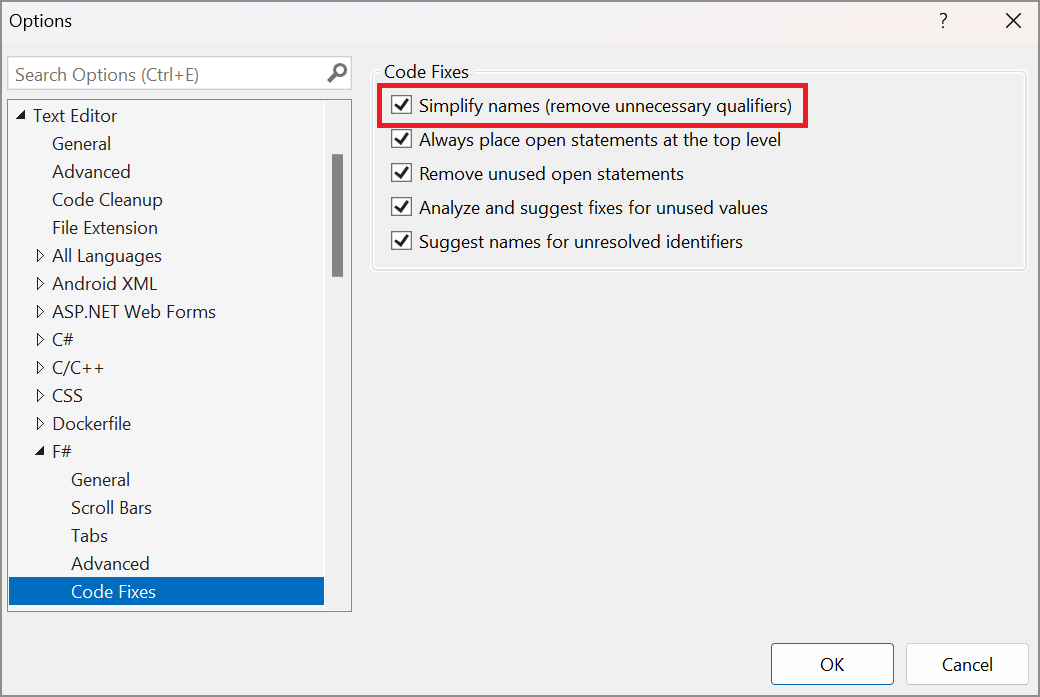
This rule isn't enabled by default. To enable it in Visual Studio, select Tools > Options, and then navigate to Text Editor > F# > Code Fixes. Select the Simplify names (remove unnecessary qualifiers) option.