.NET uses a unified model for cooperative cancellation of asynchronous or long-running synchronous operations. This model is based on a lightweight object called a cancellation token. The object that invokes one or more cancelable operations, for example by creating new threads or tasks, passes the token to each operation. Individual operations can in turn pass copies of the token to other operations. At some later time, the object that created the token can use it to request that the operations stop what they are doing. Only the requesting object can issue the cancellation request, and each listener is responsible for noticing the request and responding to it in an appropriate and timely manner.
The general pattern for implementing the cooperative cancellation model is:
Instantiate a System.Threading.CancellationTokenSource object, which manages and sends cancellation notification to the individual cancellation tokens.
Pass the token returned by the System.Threading.CancellationTokenSource.Token property to each task or thread that listens for cancellation.
Provide a mechanism for each task or thread to respond to cancellation.
Call the System.Threading.CancellationTokenSource.Cancel method to provide notification of cancellation.
The following illustration shows the relationship between a token source and all the copies of its token.
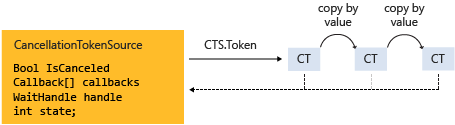
The cooperative cancellation model makes it easier to create cancellation-aware applications and libraries, and it supports the following features:
Cancellation is cooperative and is not forced on the listener. The listener determines how to gracefully terminate in response to a cancellation request.
Requesting is distinct from listening. An object that invokes a cancelable operation can control when (if ever) cancellation is requested.
The requesting object issues the cancellation request to all copies of the token by using just one method call.
A listener can listen to multiple tokens simultaneously by joining them into one linked token.
User code can notice and respond to cancellation requests from library code, and library code can notice and respond to cancellation requests from user code.
Listeners can be notified of cancellation requests by polling, callback registration, or waiting on wait handles.
Cancellation Types
The cancellation framework is implemented as a set of related types, which are listed in the following table.
| Type name | Description |
|---|---|
| System.Threading.CancellationTokenSource | Object that creates a cancellation token, and also issues the cancellation request for all copies of that token. |
| System.Threading.CancellationToken | Lightweight value type passed to one or more listeners, typically as a method parameter. Listeners monitor the value of the IsCancellationRequested property of the token by polling, callback, or wait handle. |
| System.OperationCanceledException | Overloads of this exception's constructor accept a System.Threading.CancellationToken as a parameter. Listeners can optionally throw this exception to verify the source of the cancellation and notify others that it has responded to a cancellation request. |
The cancellation model is integrated into .NET in several types. The most important ones are System.Threading.Tasks.Parallel, System.Threading.Tasks.Task, System.Threading.Tasks.Task and System.Linq.ParallelEnumerable. We recommend that you use this cooperative cancellation model for all new library and application code.
Code Example
In the following example, the requesting object creates a System.Threading.CancellationTokenSource object, and then passes its System.Threading.CancellationTokenSource.Token property to the cancelable operation. The operation that receives the request monitors the value of the System.Threading.CancellationToken.IsCancellationRequested property of the token by polling. When the value becomes true, the listener can terminate in whatever manner is appropriate. In this example, the method just exits, which is all that is required in many cases.
sample · csharpsamples/snippets/csharp/VS_Snippets_Misc/cancellation/cs/cancellationex1.cs1
// <Snippet1>
using System;
using System.Threading;

public class Example
{
    public static void Main()
    {
        // Create the token source.
        CancellationTokenSource cts = new CancellationTokenSource();

        // Pass the token to the cancelable operation.
        ThreadPool.QueueUserWorkItem(new WaitCallback(DoSomeWork), cts.Token);
        Thread.Sleep(2500);

        // Request cancellation.
        cts.Cancel();
        Console.WriteLine("Cancellation set in token source...");
        Thread.Sleep(2500);
        // Cancellation should have happened, so call Dispose.
        cts.Dispose();
    }

    // Thread 2: The listener
    static void DoSomeWork(object? obj)
    {
        if (obj is null)
            return;

        CancellationToken token = (CancellationToken)obj;

        for (int i = 0; i < 100000; i++)
        {
            if (token.IsCancellationRequested)
            {
                Console.WriteLine("In iteration {0}, cancellation has been requested...",
                                  i + 1);
                // Perform cleanup if necessary.
                //...
                // Terminate the operation.
                break;
            }
            // Simulate some work.
            Thread.SpinWait(500000);
        }
    }
}
// The example displays output like the following:
//       Cancellation set in token source...
//       In iteration 1430, cancellation has been requested...
// </Snippet1>
sample · vbsamples/snippets/visualbasic/VS_Snippets_Misc/cancellation/vb/cancellationex1.vb1
' Visual Basic .NET Document
Option Strict On

' <Snippet1>
Imports System.Threading

Module Example1
    Public Sub Main1()
        ' Create the token source.
        Dim cts As New CancellationTokenSource()

        ' Pass the token to the cancelable operation.
        ThreadPool.QueueUserWorkItem(New WaitCallback(AddressOf DoSomeWork), cts.Token)
        Thread.Sleep(2500)

        ' Request cancellation by setting a flag on the token.
        cts.Cancel()
        Console.WriteLine("Cancellation set in token source...")
        Thread.Sleep(2500)
        ' Cancellation should have happened, so call Dispose.
        cts.Dispose()
    End Sub

    ' Thread 2: The listener
    Sub DoSomeWork(ByVal obj As Object)
        Dim token As CancellationToken = CType(obj, CancellationToken)

        For i As Integer = 0 To 1000000
            If token.IsCancellationRequested Then
                Console.WriteLine("In iteration {0}, cancellation has been requested...",
                                  i + 1)
                ' Perform cleanup if necessary.
                '...
                ' Terminate the operation.
                Exit For
            End If

            ' Simulate some work.
            Thread.SpinWait(500000)
        Next
    End Sub
End Module
' The example displays output like the following:
'       Cancellation set in token source...
'       In iteration 1430, cancellation has been requested...
' </Snippet1>Operation Cancellation Versus Object Cancellation
In the cooperative cancellation framework, cancellation refers to operations, not objects. The cancellation request means that the operation should stop as soon as possible after any required cleanup is performed. One cancellation token should refer to one "cancelable operation," however that operation may be implemented in your program. After the System.Threading.CancellationToken.IsCancellationRequested property of the token has been set to true, it cannot be reset to false. Therefore, cancellation tokens cannot be reused after they have been canceled.
If you require an object cancellation mechanism, you can base it on the operation cancellation mechanism by calling the System.Threading.CancellationToken.Register method, as shown in the following example.
sample · csharpsamples/snippets/csharp/VS_Snippets_Misc/cancellation/cs/objectcancellation1.cs2
// <Snippet2>
using System;
using System.Threading;

class CancelableObject
{
    public string id;

    public CancelableObject(string id)
    {
        this.id = id;
    }

    public void Cancel()
    {
        Console.WriteLine($"Object {id} Cancel callback");
        // Perform object cancellation here.
    }
}

public class Example1
{
    public static void Main()
    {
        CancellationTokenSource cts = new CancellationTokenSource();
        CancellationToken token = cts.Token;

        // User defined Class with its own method for cancellation
        var obj1 = new CancelableObject("1");
        var obj2 = new CancelableObject("2");
        var obj3 = new CancelableObject("3");

        // Register the object's cancel method with the token's
        // cancellation request.
        token.Register(() => obj1.Cancel());
        token.Register(() => obj2.Cancel());
        token.Register(() => obj3.Cancel());

        // Request cancellation on the token.
        cts.Cancel();
        // Call Dispose when we're done with the CancellationTokenSource.
        cts.Dispose();
    }
}
// The example displays the following output:
//       Object 3 Cancel callback
//       Object 2 Cancel callback
//       Object 1 Cancel callback
// </Snippet2>
sample · vbsamples/snippets/visualbasic/VS_Snippets_Misc/cancellation/vb/objectcancellation1.vb2
' Visual Basic .NET Document
Option Strict On

' <Snippet2>
Imports System.Threading

Class CancelableObject
    Public id As String

    Public Sub New(id As String)
        Me.id = id
    End Sub

    Public Sub Cancel()
        Console.WriteLine("Object {0} Cancel callback", id)
        ' Perform object cancellation here.
    End Sub
End Class

Module ExampleOb1
    Public Sub MainOb1()
        Dim cts As New CancellationTokenSource()
        Dim token As CancellationToken = cts.Token

        ' User defined Class with its own method for cancellation
        Dim obj1 As New CancelableObject("1")
        Dim obj2 As New CancelableObject("2")
        Dim obj3 As New CancelableObject("3")

        ' Register the object's cancel method with the token's
        ' cancellation request.
        token.Register(Sub() obj1.Cancel())
        token.Register(Sub() obj2.Cancel())
        token.Register(Sub() obj3.Cancel())

        ' Request cancellation on the token.
        cts.Cancel()
        ' Call Dispose when we're done with the CancellationTokenSource.
        cts.Dispose()
    End Sub
End Module
' The example displays output like the following:
'       Object 3 Cancel callback
'       Object 2 Cancel callback
'       Object 1 Cancel callback
' </Snippet2>
If an object supports more than one concurrent cancelable operation, pass a separate token as input to each distinct cancelable operation. That way, one operation can be cancelled without affecting the others.
Listening and Responding to Cancellation Requests
In the user delegate, the implementer of a cancelable operation determines how to terminate the operation in response to a cancellation request. In many cases, the user delegate can just perform any required cleanup and then return immediately.
However, in more complex cases, it might be necessary for the user delegate to notify library code that cancellation has occurred. In such cases, the correct way to terminate the operation is for the delegate to call the System.Threading.CancellationToken.ThrowIfCancellationRequested, method, which will cause an System.OperationCanceledException to be thrown. Library code can catch this exception on the user delegate thread and examine the exception's token to determine whether the exception indicates cooperative cancellation or some other exceptional situation.
The System.Threading.Tasks.Task class handles System.OperationCanceledException in this way. For more information, see Task Cancellation.
Listening by Polling
For long-running computations that loop or recurse, you can listen for a cancellation request by periodically polling the value of the System.Threading.CancellationToken.IsCancellationRequested property. If its value is true, the method should clean up and terminate as quickly as possible. The optimal frequency of polling depends on the type of application. It is up to the developer to determine the best polling frequency for any given program. Polling itself does not significantly impact performance. The following example shows one possible way to poll.
sample · csharpsamples/snippets/csharp/VS_Snippets_Misc/cancellation/cs/cancellationex11.cs3
//<snippet11>
using System;
using System.Threading;
using System.Threading.Tasks;

public struct Rectangle
{
   public int columns;
   public int rows;
}

class CancelByPolling
{
   static void Main()
   {
      var tokenSource = new CancellationTokenSource();
      // Toy object for demo purposes
      Rectangle rect = new Rectangle() { columns = 1000, rows = 500 };

      // Simple cancellation scenario #1. Calling thread does not wait
      // on the task to complete, and the user delegate simply returns
      // on cancellation request without throwing.
      Task.Run(() => NestedLoops(rect, tokenSource.Token), tokenSource.Token);

      // Simple cancellation scenario #2. Calling thread does not wait
      // on the task to complete, and the user delegate throws
      // OperationCanceledException to shut down task and transition its state.
      // Task.Run(() => PollByTimeSpan(tokenSource.Token), tokenSource.Token);

      Console.WriteLine("Press 'c' to cancel");
      if (Console.ReadKey(true).KeyChar == 'c') {
          tokenSource.Cancel();
          Console.WriteLine("Press any key to exit.");
      }

      Console.ReadKey();
      tokenSource.Dispose();
  }

   //<snippet3>
   static void NestedLoops(Rectangle rect, CancellationToken token)
   {
      for (int col = 0; col < rect.columns && !token.IsCancellationRequested; col++) {
         // Assume that we know that the inner loop is very fast.
         // Therefore, polling once per column in the outer loop condition
         // is sufficient.
         for (int row = 0; row < rect.rows; row++) {
            // Simulating work.
            Thread.SpinWait(5_000);
            Console.Write("{0},{1} ", col, row);
         }
      }

      if (token.IsCancellationRequested) {
         // Cleanup or undo here if necessary...
         Console.WriteLine("\r\nOperation canceled");
         Console.WriteLine("Press any key to exit.");

         // If using Task:
         // token.ThrowIfCancellationRequested();
      }
   }
   //</snippet3>
}
//</snippet11>
sample · vbsamples/snippets/visualbasic/VS_Snippets_Misc/cancellation/vb/cancellationex11.vb3
Option Strict On

' How to: Cancel by using a WaitHandle
'<snippet11>
Imports System.Threading
Imports System.Threading.Tasks

Public Structure Rectangle
    Public columns As Integer
    Public rows As Integer
End Structure

Class CancelByPolling
    Shared Sub Main11()
        Dim tokenSource As New CancellationTokenSource()
        ' Toy object for demo purposes
        Dim rect As New Rectangle()
        rect.columns = 1000
        rect.rows = 500

        ' Simple cancellation scenario #1. Calling thread does not wait
        ' on the task to complete, and the user delegate simply returns
        ' on cancellation request without throwing.
        Task.Run(Sub() NestedLoops(rect, tokenSource.Token), tokenSource.Token)

        ' Simple cancellation scenario #2. Calling thread does not wait
        ' on the task to complete, and the user delegate throws
        ' OperationCanceledException to shut down task and transition its state.
        ' Task.Run(Sub() PollByTimeSpan(tokenSource.Token), tokenSource.Token)

        Console.WriteLine("Press 'c' to cancel")
        If Console.ReadKey(True).KeyChar = "c"c Then

            tokenSource.Cancel()
            Console.WriteLine("Press any key to exit.")
        End If

        Console.ReadKey()
        tokenSource.Dispose()
    End Sub

    '<snippet3>
    Shared Sub NestedLoops(ByVal rect As Rectangle, ByVal token As CancellationToken)
        Dim col As Integer
        For col = 0 To rect.columns - 1
            ' Assume that we know that the inner loop is very fast.
            ' Therefore, polling once per column in the outer loop condition
            ' is sufficient.
            For row As Integer = 0 To rect.rows - 1
                ' Simulating work.
                Thread.SpinWait(5000)
                Console.Write("0',1' ", col, row)
            Next
        Next

        If token.IsCancellationRequested = True Then
            ' Cleanup or undo here if necessary...
            Console.WriteLine(vbCrLf + "Operation canceled")
            Console.WriteLine("Press any key to exit.")

            ' If using Task:
            ' token.ThrowIfCancellationRequested()
        End If
    End Sub
    '</snippet3>
End Class
'</snippet11>
For a more complete example, see How to: Listen for Cancellation Requests by Polling.
Listening by Registering a Callback
Some operations can become blocked in such a way that they cannot check the value of the cancellation token in a timely manner. For these cases, you can register a callback method that unblocks the method when a cancellation request is received.
The System.Threading.CancellationToken.Register method returns a System.Threading.CancellationTokenRegistration object that is used specifically for this purpose. The following example shows how to use the System.Threading.CancellationToken.Register method to cancel an asynchronous web request.
sample · csharpsamples/snippets/csharp/VS_Snippets_Misc/cancellation/cs/cancellationex4.cs4
//<snippet4>
using System;
using System.Net.Http;
using System.Threading;

class Example4
{
    static void Main()
    {
        CancellationTokenSource cts = new CancellationTokenSource();

        StartWebRequest(cts.Token);

        // Cancellation will cause the web
        // request to be cancelled.
        cts.Cancel();
    }

    static void StartWebRequest(CancellationToken token)
    {
        var client = new HttpClient();

        token.Register(() =>
        {
            client.CancelPendingRequests();
            Console.WriteLine("Request cancelled!");
        });

        Console.WriteLine("Starting request.");
        client.GetStringAsync(new Uri("http://www.contoso.com"));
    }
}
//</snippet4>
sample · vbsamples/snippets/visualbasic/VS_Snippets_Misc/cancellation/vb/cancellationex4.vb4
' Visual Basic .NET Document
Option Strict On

' <Snippet4>
Imports System.Net
Imports System.Net.Http
Imports System.Threading

Class Example4
    Private Shared Sub Main4()
        Dim cts As New CancellationTokenSource()

        StartWebRequest(cts.Token)

        ' cancellation will cause the web
        ' request to be cancelled
        cts.Cancel()
    End Sub

    Private Shared Sub StartWebRequest(token As CancellationToken)
        Dim client As New HttpClient()

        token.Register(Sub()
                           client.CancelPendingRequests()
                           Console.WriteLine("Request cancelled!")
                       End Sub)

        Console.WriteLine("Starting request.")
        client.GetStringAsync(New Uri("http://www.contoso.com"))
    End Sub
End Class
' </Snippet4>
The System.Threading.CancellationTokenRegistration object manages thread synchronization and ensures that the callback will stop executing at a precise point in time.
In order to ensure system responsiveness and to avoid deadlocks, the following guidelines must be followed when registering callbacks:
The callback method should be fast because it is called synchronously and therefore the call to System.Threading.CancellationTokenSource.Cancel does not return until the callback returns.
If you call System.Threading.CancellationTokenRegistration.Dispose while the callback is running, and you hold a lock that the callback is waiting on, your program can deadlock. After
Disposereturns, you can free any resources required by the callback.Callbacks should not perform any manual thread or System.Threading.SynchronizationContext usage in a callback. If a callback must run on a particular thread, use the System.Threading.CancellationTokenRegistration constructor that enables you to specify that the target syncContext is the active System.Threading.SynchronizationContext.Current. Performing manual threading in a callback can cause deadlock.
For a more complete example, see How to: Register Callbacks for Cancellation Requests.
Listening by Using a Wait Handle
When a cancelable operation can block while it waits on a synchronization primitive such as a System.Threading.ManualResetEvent or System.Threading.Semaphore, you can use the System.Threading.CancellationToken.WaitHandle property to enable the operation to wait on both the event and the cancellation request. The wait handle of the cancellation token will become signaled in response to a cancellation request, and the method can use the return value of the System.Threading.WaitHandle.WaitAny method to determine whether it was the cancellation token that signaled. The operation can then just exit, or throw an System.OperationCanceledException, as appropriate.
sample · csharpsamples/snippets/csharp/VS_Snippets_Misc/cancellation/cs/cancellationex9.cs5
// How to: Cancel by using a WaitHandle

//<snippet9>
using System;
using System.Threading;
using System.Threading.Tasks;

class CancelOldStyleEvents
{
    // Old-style MRE that doesn't support unified cancellation.
    static ManualResetEvent mre = new ManualResetEvent(false);

    static void Main()
    {
        var cts = new CancellationTokenSource();

        // Pass the same token source to the delegate and to the task instance.
        Task.Run(() => DoWork(cts.Token), cts.Token);
        Console.WriteLine("Press s to start/restart, p to pause, or c to cancel.");
        Console.WriteLine("Or any other key to exit.");

        // Old-style UI thread.
        bool goAgain = true;
        while (goAgain)
        {
            char ch = Console.ReadKey(true).KeyChar;

            switch (ch)
            {
                case 'c':
                    cts.Cancel();
                    break;
                case 'p':
                    mre.Reset();
                    break;
                case 's':
                    mre.Set();
                    break;
                default:
                    goAgain = false;
                    break;
            }

            Thread.Sleep(100);
        }
        cts.Dispose();
    }

    static void DoWork(CancellationToken token)
    {
        while (true)
        {
            //<snippet5>
            // Wait on the event if it is not signaled.
            int eventThatSignaledIndex =
                   WaitHandle.WaitAny(new WaitHandle[] { mre, token.WaitHandle },
                                      new TimeSpan(0, 0, 20));
            //</snippet5>

            // Were we canceled while waiting?
            if (eventThatSignaledIndex == 1)
            {
                Console.WriteLine("The wait operation was canceled.");
                throw new OperationCanceledException(token);
            }
            // Were we canceled while running?
            else if (token.IsCancellationRequested)
            {
                Console.WriteLine("I was canceled while running.");
                token.ThrowIfCancellationRequested();
            }
            // Did we time out?
            else if (eventThatSignaledIndex == WaitHandle.WaitTimeout)
            {
                Console.WriteLine("I timed out.");
                break;
            }
            else
            {
                Console.Write("Working... ");
                // Simulating work.
                Thread.SpinWait(5000000);
            }
        }
    }
}
//</snippet9>
sample · vbsamples/snippets/visualbasic/VS_Snippets_Misc/cancellation/vb/cancellationex9.vb5
' Visual Basic .NET Document
Option Strict On

'<snippet9>
Imports System.Threading
Imports System.Threading.Tasks

Class CancelOldStyleEvents
    ' Old-style MRE that doesn't support unified cancellation.
    Shared mre As New ManualResetEvent(False)

    Shared Sub Main9()
        Dim cts As New CancellationTokenSource()

        ' Pass the same token source to the delegate and to the task instance.
        Task.Run(Sub() DoWork(cts.Token), cts.Token)
        Console.WriteLine("Press c to cancel, p to pause, or s to start/restart.")
        Console.WriteLine("Or any other key to exit.")

        ' Old-style UI thread.
        Dim goAgain As Boolean = True
        While goAgain
            Dim ch As Char = Console.ReadKey(True).KeyChar
            Select Case ch
                Case "c"c
                    cts.Cancel()
                Case "p"c
                    mre.Reset()
                Case "s"c
                    mre.Set()
                Case Else
                    goAgain = False
            End Select

            Thread.Sleep(100)
        End While
        cts.Dispose()
    End Sub

    Shared Sub DoWork(ByVal token As CancellationToken)
        While True
            '<snippet5>
            ' Wait on the event if it is not signaled.
            Dim waitHandles() As WaitHandle = {mre, token.WaitHandle}
            Dim eventThatSignaledIndex =
                WaitHandle.WaitAny(waitHandles, _
                                   New TimeSpan(0, 0, 20))
            '</snippet5>

            ' Were we canceled while waiting?
            ' The first If statement is equivalent to
            ' token.ThrowIfCancellationRequested()
            If eventThatSignaledIndex = 1 Then
                Console.WriteLine("The wait operation was canceled.")
                Throw New OperationCanceledException(token)
                ' Were we canceled while running?
            ElseIf token.IsCancellationRequested = True Then
                Console.WriteLine("Cancelling per user request.")
                token.ThrowIfCancellationRequested()
                ' Did we time out?
            ElseIf eventThatSignaledIndex = WaitHandle.WaitTimeout Then
                Console.WriteLine("The wait operation timed out.")
                Exit While
            Else
                ' Simulating work.
                Console.Write("Working... ")
                Thread.SpinWait(5000000)
            End If
        End While
    End Sub
End Class
'</snippet9>
System.Threading.ManualResetEventSlim and System.Threading.SemaphoreSlim both support the cancellation framework in their Wait methods. You can pass the System.Threading.CancellationToken to the method, and when the cancellation is requested, the event wakes up and throws an System.OperationCanceledException.
sample · csharpsamples/snippets/csharp/VS_Snippets_Misc/cancellation/cs/cancellationex10.cs6
//<Snippet10>
using System;
using System.Threading;
using System.Threading.Tasks;

class CancelNewStyleEvents
{
   // New-style MRESlim that supports unified cancellation
   // in its Wait methods.
   static ManualResetEventSlim mres = new ManualResetEventSlim(false);

   static void Main()
   {
      var cts = new CancellationTokenSource();

      // Pass the same token source to the delegate and to the task instance.
      Task.Run(() => DoWork(cts.Token), cts.Token);
      Console.WriteLine("Press c to cancel, p to pause, or s to start/restart,");
      Console.WriteLine("or any other key to exit.");

      // New-style UI thread.
         bool goAgain = true;
         while (goAgain)
         {
             char ch = Console.ReadKey(true).KeyChar;

             switch (ch)
             {
                 case 'c':
                     // Token can only be canceled once.
                     cts.Cancel();
                     break;
                 case 'p':
                     mres.Reset();
                     break;
                 case 's':
                     mres.Set();
                     break;
                 default:
                     goAgain = false;
                     break;
             }

             Thread.Sleep(100);
         }
         cts.Dispose();
     }

     static void DoWork(CancellationToken token)
     {

         while (true)
         {
             if (token.IsCancellationRequested)
             {
                 Console.WriteLine("Canceled while running.");
                 token.ThrowIfCancellationRequested();
             }

             // Wait on the event to be signaled
             // or the token to be canceled,
             // whichever comes first. The token
             // will throw an exception if it is canceled
             // while the thread is waiting on the event.
             //<snippet6>
             try
             {
                 // mres is a ManualResetEventSlim
                 mres.Wait(token);
             }
             catch (OperationCanceledException)
             {
                 // Throw immediately to be responsive. The
                 // alternative is to do one more item of work,
                 // and throw on next iteration, because
                 // IsCancellationRequested will be true.
                 Console.WriteLine("The wait operation was canceled.");
                 throw;
             }

             Console.Write("Working...");
             // Simulating work.
             Thread.SpinWait(500000);
             //</snippet6>
         }
     }
 }
 //</Snippet10>
sample · vbsamples/snippets/visualbasic/VS_Snippets_Misc/cancellation/vb/cancellationex10.vb6
' Visual Basic .NET Document
Option Strict On

'<Snippet10>
Imports System.Threading
Imports System.Threading.Tasks

Class CancelNewStyleEvents

    ' New-style MRESlim that supports unified cancellation
    ' in its Wait methods.
    Shared mres As ManualResetEventSlim = New ManualResetEventSlim(False)

    Shared Sub Main10()

        Dim cts As New CancellationTokenSource()

        ' Pass the same token source to the delegate and to the task instance.
        Task.Run(Sub() DoWork(cts.Token), cts.Token)
        Console.WriteLine("Press c to cancel, p to pause, or s to start/restart,")
        Console.WriteLine("or any other key to exit.")

        ' New-style UI thread.
        Dim goAgain As Boolean = True
        While goAgain = True

            Dim ch As Char = Console.ReadKey(True).KeyChar

            Select Case ch
                Case "c"c
                    ' Token can only be canceled once.
                    cts.Cancel()
                Case "p"c
                    mres.Reset()
                Case "s"c
                    mres.Set()
                Case Else
                    goAgain = False
            End Select

            Thread.Sleep(100)
        End While
        cts.Dispose()
    End Sub

    Shared Sub DoWork(ByVal token As CancellationToken)
        While True
            If token.IsCancellationRequested Then
                Console.WriteLine("Canceled while running.")
                token.ThrowIfCancellationRequested()
            End If

            ' Wait on the event to be signaled
            ' or the token to be canceled,
            ' whichever comes first. The token
            ' will throw an exception if it is canceled
            ' while the thread is waiting on the event.
            '<snippet6>
            Try
                ' mres is a ManualResetEventSlim
                mres.Wait(token)
            Catch e As OperationCanceledException
                ' Throw immediately to be responsive. The
                ' alternative is to do one more item of work,
                ' and throw on next iteration, because
                ' IsCancellationRequested will be true.
                Console.WriteLine("Canceled while waiting.")
                Throw
            End Try

            ' Simulating work.
            Console.Write("Working...")
            Thread.SpinWait(500000)
            '</snippet6>
        End While
    End Sub
End Class
'</Snippet10>
For a more complete example, see How to: Listen for Cancellation Requests That Have Wait Handles.
Listen to multiple tokens simultaneously
In some cases, a listener might have to listen to multiple cancellation tokens simultaneously. For example, a cancelable operation might have to monitor an internal cancellation token in addition to a token passed in externally as an argument to a method parameter. To accomplish this, create a linked token source that can join two or more tokens into one token.
The following example shows the most common use of a linked token: a child token that is cancelled when the parent token is cancelled. You can also cancel the child independently by calling Cancel on the child CancellationTokenSource.
sample · csharpdocs/standard/threading/snippets/cancellation-in-managed-threads/csharp/LinkedTokens/Program.csLinkedTokens
// <LinkedTokens>
using System.Threading;

// Create the parent CancellationTokenSource.
using var parentCts = new CancellationTokenSource();
CancellationToken parentToken = parentCts.Token;

// Create a linked child CancellationTokenSource.
// The child token is cancelled when the parent token is cancelled.
using var childCts = CancellationTokenSource.CreateLinkedTokenSource(parentToken);
CancellationToken childToken = childCts.Token;

Console.WriteLine($"Parent is cancelled: {parentToken.IsCancellationRequested}");
Console.WriteLine($"Child is cancelled: {childToken.IsCancellationRequested}");

// Cancel the parent.
parentCts.Cancel();

Console.WriteLine($"Parent is cancelled: {parentToken.IsCancellationRequested}");
Console.WriteLine($"Child is cancelled: {childToken.IsCancellationRequested}");

// Output:
// Parent is cancelled: False
// Child is cancelled: False
// Parent is cancelled: True
// Child is cancelled: True
// </LinkedTokens>
sample · vbdocs/standard/threading/snippets/cancellation-in-managed-threads/vb/LinkedTokens/Program.vbLinkedTokens
' <LinkedTokens>
Imports System.Threading

Module Program
    Sub Main()
        ' Create the parent CancellationTokenSource.
        Using parentCts As New CancellationTokenSource()
            Dim parentToken As CancellationToken = parentCts.Token

            ' Create a linked child CancellationTokenSource.
            ' The child token is cancelled when the parent token is cancelled.
            Using childCts As CancellationTokenSource = CancellationTokenSource.CreateLinkedTokenSource(parentToken)
                Dim childToken As CancellationToken = childCts.Token

                Console.WriteLine($"Parent is cancelled: {parentToken.IsCancellationRequested}")
                Console.WriteLine($"Child is cancelled: {childToken.IsCancellationRequested}")

                ' Cancel the parent.
                parentCts.Cancel()

                Console.WriteLine($"Parent is cancelled: {parentToken.IsCancellationRequested}")
                Console.WriteLine($"Child is cancelled: {childToken.IsCancellationRequested}")
            End Using
        End Using
    End Sub
End Module
' Output:
' Parent is cancelled: False
' Child is cancelled: False
' Parent is cancelled: True
' Child is cancelled: True
' </LinkedTokens>
A more complex scenario involves a cancelable operation that must monitor both an external token passed in from a caller and an internal token. The following example shows how to create such a linked token.
sample · csharpsamples/snippets/csharp/VS_Snippets_Misc/cancellation/cs/cancellationex13.cs7
//<snippet13>
using System;
using System.Threading;
using System.Threading.Tasks;

class LinkedTokenSourceDemo
{
    static void Main()
    {
        WorkerWithTimer worker = new WorkerWithTimer();
        CancellationTokenSource cts = new CancellationTokenSource();

        // Task for UI thread, so we can call Task.Wait wait on the main thread.
        Task.Run(() =>
        {
            Console.WriteLine("Press 'c' to cancel within 3 seconds after work begins.");
            Console.WriteLine("Or let the task time out by doing nothing.");
            if (Console.ReadKey(true).KeyChar == 'c')
                cts.Cancel();
        });

        // Let the user read the UI message.
        Thread.Sleep(1000);

        // Start the worker task.
        Task task = Task.Run(() => worker.DoWork(cts.Token), cts.Token);

        try
        {
            task.Wait(cts.Token);
        }
        catch (OperationCanceledException e)
        {
            if (e.CancellationToken == cts.Token)
                Console.WriteLine("Canceled from UI thread throwing OCE.");
        }
        catch (AggregateException ae)
        {
            Console.WriteLine("AggregateException caught: " + ae.InnerException);
            foreach (var inner in ae.InnerExceptions)
            {
                Console.WriteLine(inner.Message + inner.Source);
            }
        }

        Console.WriteLine("Press any key to exit.");
        Console.ReadKey();
        cts.Dispose();
    }
}

class WorkerWithTimer
{
    CancellationTokenSource internalTokenSource = new CancellationTokenSource();
    CancellationToken internalToken;
    CancellationToken externalToken;
    Timer timer;

    public WorkerWithTimer()
    {
        // A toy cancellation trigger that times out after 3 seconds
        // if the user does not press 'c'.
        timer = new Timer(new TimerCallback(CancelAfterTimeout), null, 3000, 3000);
    }

    //<snippet7>
    public void DoWork(CancellationToken externalToken)
    {
        // Create a new token that combines the internal and external tokens.
        this.internalToken = internalTokenSource.Token;
        this.externalToken = externalToken;

        using (CancellationTokenSource linkedCts =
                CancellationTokenSource.CreateLinkedTokenSource(internalToken, externalToken))
        {
            try
            {
                DoWorkInternal(linkedCts.Token);
            }
            catch (OperationCanceledException)
            {
                if (internalToken.IsCancellationRequested)
                {
                    Console.WriteLine("Operation timed out.");
                }
                else if (externalToken.IsCancellationRequested)
                {
                    Console.WriteLine("Cancelling per user request.");
                    externalToken.ThrowIfCancellationRequested();
                }
            }
        }
    }
    //</snippet7>

    private void DoWorkInternal(CancellationToken token)
    {
        for (int i = 0; i < 1000; i++)
        {
            if (token.IsCancellationRequested)
            {
                // We need to dispose the timer if cancellation
                // was requested by the external token.
                timer.Dispose();

                // Throw the exception.
                token.ThrowIfCancellationRequested();
            }

            // Simulating work.
            Thread.SpinWait(7500000);
            Console.Write("working... ");
        }
    }

    public void CancelAfterTimeout(object? state)
    {
        Console.WriteLine("\r\nTimer fired.");
        internalTokenSource.Cancel();
        timer.Dispose();
    }
}
//</snippet13>
sample · vbsamples/snippets/visualbasic/VS_Snippets_Misc/cancellation/vb/cancellationex13.vb7
' Visual Basic .NET Document
Option Strict On

'<snippet13>
Imports System.Threading
Imports System.Threading.Tasks

Class LinkedTokenSourceDemo
    Shared Sub Main13()
        Dim worker As New WorkerWithTimer()
        Dim cts As New CancellationTokenSource()

        ' Task for UI thread, so we can call Task.Wait wait on the main thread.
        Task.Run(Sub()
                     Console.WriteLine("Press 'c' to cancel within 3 seconds after work begins.")
                     Console.WriteLine("Or let the task time out by doing nothing.")
                     If Console.ReadKey(True).KeyChar = "c"c Then
                         cts.Cancel()
                     End If
                 End Sub)
        ' Let the user read the UI message.
        Thread.Sleep(1000)

        ' Start the worker task.
        Dim t As Task = Task.Run(Sub() worker.DoWork(cts.Token), cts.Token)
        Try
            t.Wait()
        Catch ae As AggregateException
            For Each inner In ae.InnerExceptions
                Console.WriteLine(inner.Message)
            Next
        End Try

        Console.WriteLine("Press any key to exit.")
        Console.ReadKey()
        cts.Dispose()
    End Sub
End Class

Class WorkerWithTimer
    Dim internalTokenSource As CancellationTokenSource
    Dim token As CancellationToken
    Dim timer As Timer

    Public Sub New()
        internalTokenSource = New CancellationTokenSource()
        token = internalTokenSource.Token

        ' A toy cancellation trigger that times out after 3 seconds
        ' if the user does not press 'c'.
        timer = New Timer(New TimerCallback(AddressOf CancelAfterTimeout), Nothing, 3000, 3000)
    End Sub

    '<snippet7>
    Public Sub DoWork(ByVal externalToken As CancellationToken)
        ' Create a new token that combines the internal and external tokens.
        Dim internalToken As CancellationToken = internalTokenSource.Token
        Dim linkedCts As CancellationTokenSource =
        CancellationTokenSource.CreateLinkedTokenSource(internalToken, externalToken)
        Using (linkedCts)
            Try
                DoWorkInternal(linkedCts.Token)
            Catch e As OperationCanceledException
                If e.CancellationToken = internalToken Then
                    Console.WriteLine("Operation timed out.")
                ElseIf e.CancellationToken = externalToken Then
                    Console.WriteLine("Canceled by external token.")
                    externalToken.ThrowIfCancellationRequested()
                End If
            End Try
        End Using
    End Sub
    '</snippet7>

    Private Sub DoWorkInternal(ByVal token As CancellationToken)
        For i As Integer = 0 To 1000
            If token.IsCancellationRequested Then
                ' We need to dispose the timer if cancellation
                ' was requested by the external token.
                timer.Dispose()

                ' Output for demonstration purposes.
                Console.WriteLine(vbCrLf + "Cancelling per request.")

                ' Throw the exception.
                token.ThrowIfCancellationRequested()
            End If

            ' Simulating work.
            Thread.SpinWait(7500000)
            Console.Write("working... ")
        Next
    End Sub

    Public Sub CancelAfterTimeout(ByVal state As Object)
        Console.WriteLine(vbCrLf + "Timer fired.")
        internalTokenSource.Cancel()
        timer.Dispose()
    End Sub
End Class
'</snippet13>
Notice that you must call Dispose on the linked token source when you're done with it. For a more complete example, see How to: Listen for Multiple Cancellation Requests.
Cooperation Between Library Code and User Code
The unified cancellation framework makes it possible for library code to cancel user code, and for user code to cancel library code in a cooperative manner. Smooth cooperation depends on each side following these guidelines:
If library code provides cancelable operations, it should also provide public methods that accept an external cancellation token so that user code can request cancellation.
If library code calls into user code, the library code should interpret an OperationCanceledException(externalToken) as cooperative cancellation, and not necessarily as a failure exception.
User-delegates should attempt to respond to cancellation requests from library code in a timely manner.
System.Threading.Tasks.Task and System.Linq.ParallelEnumerable are examples of classes that follow these guidelines. For more information, see Task Cancellation and How to: Cancel a PLINQ Query.