Parallel LINQ (PLINQ) is a parallel implementation of the Language-Integrated Query (LINQ) pattern. PLINQ implements the full set of LINQ standard query operators as extension methods for the System.Linq namespace and has additional operators for parallel operations. PLINQ combines the simplicity and readability of LINQ syntax with the power of parallel programming.
What is a Parallel query?
A PLINQ query in many ways resembles a non-parallel LINQ to Objects query. PLINQ queries, just like sequential LINQ queries, operate on any in-memory System.Collections.IEnumerable or System.Collections.Generic.IEnumerable data source, and have deferred execution, which means they do not begin executing until the query is enumerated. The primary difference is that PLINQ attempts to make full use of all the processors on the system. It does this by partitioning the data source into segments, and then executing the query on each segment on separate worker threads in parallel on multiple processors. In many cases, parallel execution means that the query runs significantly faster.
Through parallel execution, PLINQ can achieve significant performance improvements over legacy code for certain kinds of queries, often just by adding the System.Linq.ParallelEnumerable.AsParallel query operation to the data source. However, parallelism can introduce its own complexities, and not all query operations run faster in PLINQ. In fact, parallelization actually slows down certain queries. Therefore, you should understand how issues such as ordering affect parallel queries. For more information, see Understanding Speedup in PLINQ.
The remainder of this article gives an overview of the main PLINQ classes and discusses how to create PLINQ queries. Each section contains links to more detailed information and code examples.
The ParallelEnumerable Class
The System.Linq.ParallelEnumerable class exposes almost all of PLINQ's functionality. It and the rest of the System.Linq namespace types are compiled into the System.Core.dll assembly. The default C# and Visual Basic projects in Visual Studio both reference the assembly and import the namespace.
System.Linq.ParallelEnumerable includes implementations of all the standard query operators that LINQ to Objects supports, although it does not attempt to parallelize each one. If you are not familiar with LINQ, see Introduction to LINQ (C#) and Introduction to LINQ (Visual Basic).
In addition to the standard query operators, the System.Linq.ParallelEnumerable class contains a set of methods that enable behaviors specific to parallel execution. These PLINQ-specific methods are listed in the following table.
| ParallelEnumerable Operator | Description |
|---|---|
| System.Linq.ParallelEnumerable.AsParallel | The entry point for PLINQ. Specifies that the rest of the query should be parallelized, if it is possible. |
| System.Linq.ParallelEnumerable.AsSequential | Specifies that the rest of the query should be run sequentially, as a non-parallel LINQ query. |
| System.Linq.ParallelEnumerable.AsOrdered | Specifies that PLINQ should preserve the ordering of the source sequence for the rest of the query, or until the ordering is changed, for example by the use of an orderby (Order By in Visual Basic) clause. |
| System.Linq.ParallelEnumerable.AsUnordered | Specifies that PLINQ for the rest of the query is not required to preserve the ordering of the source sequence. |
| System.Linq.ParallelEnumerable.WithCancellation | Specifies that PLINQ should periodically monitor the state of the provided cancellation token and cancel execution if it is requested. |
| System.Linq.ParallelEnumerable.WithDegreeOfParallelism | Specifies the maximum number of processors that PLINQ should use to parallelize the query. |
| System.Linq.ParallelEnumerable.WithMergeOptions | Provides a hint about how PLINQ should, if it is possible, merge parallel results back into just one sequence on the consuming thread. |
| System.Linq.ParallelEnumerable.WithExecutionMode | Specifies whether PLINQ should parallelize the query even when the default behavior would be to run it sequentially. |
| System.Linq.ParallelEnumerable.ForAll | A multithreaded enumeration method that, unlike iterating over the results of the query, enables results to be processed in parallel without first merging back to the consumer thread. |
| System.Linq.ParallelEnumerable.Aggregate overload | An overload that is unique to PLINQ and enables intermediate aggregation over thread-local partitions, plus a final aggregation function to combine the results of all partitions. |
The Opt-in Model
When you write a query, opt in to PLINQ by invoking the System.Linq.ParallelEnumerable.AsParallel extension method on the data source, as shown in the following example.
sample · csharpsamples/snippets/csharp/VS_Snippets_Misc/plinq/cs/plinq2_cs.cs1
using System;
using System.Collections.Concurrent;
using System.Collections.Generic;
using System.Linq;

class Example
{
    public static void Main()
    {
        IntroTopic_OptInModel();
        IntroTopic_OptIntoOrdering();
        ForAllOperator();
        CustomPartitioners();
    }

    static void IntroTopic_OptInModel()
    {
        // <snippet1>
        var source = Enumerable.Range(1, 10000);

        // Opt in to PLINQ with AsParallel.
        var evenNums = from num in source.AsParallel()
                       where num % 2 == 0
                       select num;
        Console.WriteLine($"{evenNums.Count()} even numbers out of {source.Count()} total");
        // The example displays the following output:
        //       5000 even numbers out of 10000 total
        // </snippet1>
    }

    static int Compute(int i)
    {
        return 1;
    }

    static void IntroTopic_OptIntoOrdering()
    {
        var numbers = Enumerable.Range(0, 1000);
        // <snippet3>
        var evenNums =
            from num in numbers.AsParallel().AsOrdered()
            where num % 2 == 0
            select num;
        // </snippet3>
    }

    static void ForAllOperator()
    {
        var concurrentBag = new ConcurrentBag<int>();

        // <snippet4>
        var nums = Enumerable.Range(10, 10000);
        var query =
            from num in nums.AsParallel()
            where num % 10 == 0
            select num;

        // Process the results as each thread completes
        // and add them to a System.Collections.Concurrent.ConcurrentBag(Of Int)
        // which can safely accept concurrent add operations
        query.ForAll(e => concurrentBag.Add(Compute(e)));
        // </snippet4>
    }

    static void CustomPartitioners()
    {
        // <Snippet2>
        int[] arr = new int[9999];
        Partitioner<int> partitioner = new MyArrayPartitioner<int>(arr);
        var query = partitioner.AsParallel().Select(SomeFunction);
        // </Snippet2>
    }

    public static int SomeFunction(int x)
    {
        return x * x;
    }
}

class MyArrayPartitioner<T> : Partitioner<T>
{
    private readonly List<T> _list = new();

    public MyArrayPartitioner(T[] arr)
    {
        foreach (var element in arr)
        {
            _list.Add(element);
        }
    }

    public override IList<IEnumerator<T>> GetPartitions(int partitionCount)
    {
        List<IEnumerator<T>> enumList = new();
        enumList.Add(_list.GetEnumerator());
        return enumList;
    }
}
sample · vbsamples/snippets/visualbasic/VS_Snippets_Misc/plinq/vb/plinq2_vb.vb1
Imports System.Collections.Concurrent

Module Module1

    Sub IntroTopic_OptInModel()

        '<snippet1>
        Dim source = Enumerable.Range(1, 10000)

        ' Opt in to PLINQ with AsParallel
        Dim evenNums = From num In source.AsParallel()
                       Where num Mod 2 = 0
                       Select num
        Console.WriteLine("{0} even numbers out of {1} total",
                          evenNums.Count(), source.Count())
        ' The example displays the following output:
        '       5000 even numbers out of 10000 total
        ' </snippet1>

    End Sub

    Function Compute(ByVal i As Integer) As Double
        Return 1.0
    End Function
    Function ProcessWithSideEffects(ByVal i As Integer) As Double
        Return 1.0
    End Function

    Sub IntroTopic_DOP()
        Dim source = Enumerable.Range(1, 10000)
        '<snippet5>
        Dim query = From item In source.AsParallel().WithDegreeOfParallelism(2)
                    Where Compute(item) > 42
                    Select item
        '</snippet5>
    End Sub

    Sub IntroTopic_OptIntoOrdering()

        Dim numbers = Enumerable.Range(0, 1000)
        '<snippet3>
        Dim evenNums = From num In numbers.AsParallel().AsOrdered()
                       Where num Mod 2 = 0
                       Select num


        '</snippet3>
    End Sub

    Sub ForAllOperator()

        Dim concurrentBag As New ConcurrentBag(Of Integer)

        '<snippet4>
        Dim nums = Enumerable.Range(10, 10000)
        Dim query = From num In nums.AsParallel()
                    Where num Mod 10 = 0
                    Select num

        ' Process the results as each thread completes
        ' and add them to a System.Collections.Concurrent.ConcurrentBag(Of Int)
        ' which can safely accept concurrent add operations
        query.ForAll(Sub(e) concurrentBag.Add(Compute(e)))
        '</snippet4>
    End Sub

    Sub OrderPreservation()
        Dim cities() = {New City}
        Dim people() = {New Person}

        'Order Preservation In PLINQ 1st snippet
        '<snippet8>
        Dim cityQuery = From city In cities.AsParallel()
                        Where city.Population > 10000
                        Take (1000)
        '</snippet8>


        'Order Preservation In PLINQ 2nd snippet
        '<snippet9>
        Dim orderedCities = From city In cities.AsParallel().AsOrdered()
                            Where city.Population > 10000
                            Take (1000)
        '</snippet9>

        '<snippet6>
        Dim orderedCities2 = From city In cities.AsParallel().AsOrdered()
                             Where city.Population > 10000
                             Select city
                             Take (1000)

        Dim finalResult = From city In orderedCities2.AsUnordered()
                          Join p In people.AsParallel() On city.Name Equals p.CityName
                          Select New With {.Name = city.Name, .Pop = city.Population, .Mayor = city.Mayor}

        For Each city In finalResult
            Console.WriteLine(city.Name & ":" & city.Pop & ":" & city.Mayor)
        Next

        '</snippet6>

        '<snippet7>
        Dim orderedCities3 = From city In cities.AsParallel()
                             Where city.Population > 10000
                             Order By city.Name
                             Take (1000)
        '</snippet7>

    End Sub
    Class City
        Public Name As String
        Public Population As Integer
        Public Mayor As String
    End Class

    Class Person
        Public Name As String
        Public CityName As String
    End Class

    Class Customer
        Public Orders() As Order
    End Class

    Class Order
        Public amount As Double
        Public OrderDate As DateTime
    End Class


    Function ExpensiveFunc(ByVal I As Integer) As Double 'dummy
        Return 1.0
    End Function

    Sub MergeOptions()
        Dim nums = Enumerable.Range(0, 1000)
        '<snippet26>
        Dim scanlines = From n In nums.AsParallel().WithMergeOptions(ParallelMergeOptions.NotBuffered)
                        Where n Mod 2 = 0
                        Select ExpensiveFunc(n)

        '</snippet26>
    End Sub

    Sub OverParallelization()
        Dim customers() = {New Customer}
        Dim aDate = DateTime.Now
        '<snippet20>
        Dim q = From cust In customers.AsParallel()
                From order In cust.Orders.AsParallel()
                Where order.OrderDate > aDate
                Select New With {cust, order}

        '</snippet20>
    End Sub

    '<snippet23>
    Class MergeOptions2
        Sub DoMergeOptions()

            Dim nums = Enumerable.Range(1, 10000)

            ' Replace NotBuffered with AutoBuffered
            ' or FullyBuffered to compare behavior.
            Dim scanLines = From n In nums.AsParallel().WithMergeOptions(ParallelMergeOptions.NotBuffered)
                            Where n Mod 2 = 0
                            Select ExpensiveFunc(n)

            Dim sw = Stopwatch.StartNew()
            For Each line In scanLines
                Console.WriteLine(line)
            Next

            Console.WriteLine("Elapsed time: {0} ms. Press any key to exit.")
            Console.ReadKey()

        End Sub
        ' A function that demonstrates what a fly
        ' sees when it watches television :-)
        Function ExpensiveFunc(ByVal i As Integer) As String
            Threading.Thread.SpinWait(2000000)
            Return String.Format("{0} *****************************************", i)
        End Function
    End Class
    '</snippet23>
End Module
The System.Linq.ParallelEnumerable.AsParallel extension method binds the subsequent query operators, in this case, where and select, to the System.Linq.ParallelEnumerable implementations.
Execution Modes
By default, PLINQ is conservative. At runtime, the PLINQ infrastructure analyzes the overall structure of the query. If the query is likely to yield speedups by parallelization, PLINQ partitions the source sequence into tasks that can be run concurrently. If it is not safe to parallelize a query, PLINQ just runs the query sequentially. If PLINQ has a choice between a potentially expensive parallel algorithm or an inexpensive sequential algorithm, it chooses the sequential algorithm by default. You can use the System.Linq.ParallelEnumerable.WithExecutionMode method and the System.Linq.ParallelExecutionMode enumeration to instruct PLINQ to select the parallel algorithm. This is useful when you know by testing and measurement that a particular query executes faster in parallel. For more information, see How to: Specify the Execution Mode in PLINQ.
Degree of Parallelism
By default, PLINQ uses all of the processors on the host computer. You can instruct PLINQ to use no more than a specified number of processors by using the System.Linq.ParallelEnumerable.WithDegreeOfParallelism method. This is useful when you want to make sure that other processes running on the computer receive a certain amount of CPU time. The following snippet limits the query to utilizing a maximum of two processors.
sample · csharpsamples/snippets/csharp/VS_Snippets_Misc/plinq/cs/plinqsamples.cs5
namespace PLINQ_Samples
{
using System;
using System.Collections.Generic;
using System.Linq;
using System.Threading;
class City
{
public int Population = 0;
public string Name = string.Empty;
}
class Person
{
public string Mayor = string.Empty;
public string CityName = string.Empty;
}
partial class PLINQProgram
{
static int Compute(int i) { return 1; }
static void Main_2(string[] args)
{
// SimpleQuery();
// OrderedQuery3();
//SequentialDemo(); ;
Console.ReadLine();
}
static void DOP()
{
var source = Enumerable.Range(0, 100000);
//<snippet5>
var query = from item in source.AsParallel().WithDegreeOfParallelism(2)
where Compute(item) > 42
select item;
//</snippet5>
}
static void Test()
{
var cities = new List<City>();
var people = new List<Person>();
// Order Preservation In PLINQ 1st snippet
//<snippet8>
var cityQuery =
(from city in cities.AsParallel()
where city.Population > 10000
select city).Take(1000);
//</snippet8>
// Order Preservation In PLINQ 2nd snippet
//<snippet9>
var orderedCities =
(from city in cities.AsParallel().AsOrdered()
where city.Population > 10000
select city).Take(1000);
//</snippet9>
//<snippet6>
var orderedCities2 =
(from city in cities.AsParallel().AsOrdered()
where city.Population > 10000
select city).Take(1000);
var finalResult =
from city in orderedCities2.AsUnordered()
join p in people.AsParallel()
on city.Name equals p.CityName into details
from c in details
select new
{
city.Name,
Pop = city.Population,
c.Mayor
};
foreach (var city in finalResult) { /*...*/ }
//</snippet6>
//...
////…
//You can write the same query in method based syntax as follows:
//[example]
//Another way to minimize the expense of order preservation is to impose a new ordering explicitly at a later stage in the query, after all filters have been applied, as shown in the following example:
//<snippet7>
var orderedCities3 =
(from city in cities.AsParallel()
where city.Population > 10000
orderby city.Name
select city).Take(1000);
//</snippet7>
}
static void SimpleQuery()
{
var source = Enumerable.Range(100, 20000);
// Result sequence might be out of order.
var parallelQuery =
from num in source.AsParallel()
where num % 10 == 0
select num;
// Process result sequence in parallel
parallelQuery.ForAll(DoSomething);
// Or use foreach to merge results first.
foreach (var n in parallelQuery)
{
Console.WriteLine(n);
}
// You can also use ToArray, ToList, etc
// as with LINQ to Objects.
var parallelQuery2 =
(from num in source.AsParallel()
where num % 10 == 0
select num).ToArray();
// Method syntax is also supported
var parallelQuery3 =
source.AsParallel()
.Where(n => n % 10 == 0)
.Select(n => n);
Console.ReadLine();
}
static void DoSomething(int i) { }
static void OrderedQuery()
{
//<snippet12>
var source = Enumerable.Range(9, 10000);
// Source is ordered; let's preserve it.
var parallelQuery =
from num in source.AsParallel().AsOrdered()
where num % 3 == 0
select num;
// Use foreach to preserve order at execution time.
foreach (var item in parallelQuery)
{
Console.Write($"{item} ");
}
// Some operators expect an ordered source sequence.
var lowValues = parallelQuery.Take(10);
//</snippet12>
}
static void OrderedQuery2()
{
var source = Enumerable.Range(108, 100000);
var parallelQuery =
from num in source.AsParallel().AsOrdered()
where num % 8 == 0
select num;
// use foreach to preserve ordering
// during query execution.
foreach (var item in parallelQuery)
{
Console.Write($"{item} ");
}
}
static void OrderedQuery3()
{
//<Snippet13>
var source = Enumerable.Range(8, 100000);
// Let the query access the data source will full parallelism
// and apply ordering to the filtered results.
var orderedQuery =
from num in source.AsParallel()
where num % 8 == 0
orderby num
select num;
// use foreach to preserve query ordering
foreach (var item in orderedQuery)
{
Console.Write($"{item} ");
}
//</snippet13>
}
}
//<snippet16>
namespace PLINQCancellation_1
{
using System;
using System.Linq;
using System.Threading;
using System.Threading.Tasks;
using static System.Console;
class Program
{
static void Main()
{
int[] source = Enumerable.Range(1, 10000000).ToArray();
using CancellationTokenSource cts = new();
// Start a new asynchronous task that will cancel the
// operation from another thread. Typically you would call
// Cancel() in response to a button click or some other
// user interface event.
Task.Factory.StartNew(() =>
{
UserClicksTheCancelButton(cts);
});
int[]? results = null;
try
{
results =
(from num in source.AsParallel().WithCancellation(cts.Token)
where num % 3 == 0
orderby num descending
select num).ToArray();
}
catch (OperationCanceledException e)
{
WriteLine(e.Message);
}
catch (AggregateException ae)
{
if (ae.InnerExceptions != null)
{
foreach (Exception e in ae.InnerExceptions)
{
WriteLine(e.Message);
}
}
}
foreach (var item in results ?? Array.Empty<int>())
{
WriteLine(item);
}
WriteLine();
ReadKey();
}
static void UserClicksTheCancelButton(CancellationTokenSource cts)
{
// Wait between 150 and 500 ms, then cancel.
// Adjust these values if necessary to make
// cancellation fire while query is still executing.
Random rand = new();
Thread.Sleep(rand.Next(150, 500));
cts.Cancel();
}
}
}
//</snippet16>
//<snippet17>
namespace PLINQCancellation_2
{
using System;
using System.Linq;
using System.Threading;
using System.Threading.Tasks;
using static System.Console;
class Program
{
static void Main(string[] args)
{
int[] source = Enumerable.Range(1, 10000000).ToArray();
using CancellationTokenSource cts = new();
// Start a new asynchronous task that will cancel the
// operation from another thread. Typically you would call
// Cancel() in response to a button click or some other
// user interface event.
Task.Factory.StartNew(() =>
{
UserClicksTheCancelButton(cts);
});
double[]? results = null;
try
{
results =
(from num in source.AsParallel().WithCancellation(cts.Token)
where num % 3 == 0
select Function(num, cts.Token)).ToArray();
}
catch (OperationCanceledException e)
{
WriteLine(e.Message);
}
catch (AggregateException ae)
{
if (ae.InnerExceptions != null)
{
foreach (Exception e in ae.InnerExceptions)
WriteLine(e.Message);
}
}
foreach (var item in results ?? Array.Empty<double>())
{
WriteLine(item);
}
WriteLine();
ReadKey();
}
// A toy method to simulate work.
static double Function(int n, CancellationToken ct)
{
// If work is expected to take longer than 1 ms
// then try to check cancellation status more
// often within that work.
for (int i = 0; i < 5; i++)
{
// Work hard for approx 1 millisecond.
Thread.SpinWait(50000);
// Check for cancellation request.
ct.ThrowIfCancellationRequested();
}
// Anything will do for our purposes.
return Math.Sqrt(n);
}
static void UserClicksTheCancelButton(CancellationTokenSource cts)
{
// Wait between 150 and 500 ms, then cancel.
// Adjust these values if necessary to make
// cancellation fire while query is still executing.
Random rand = new();
Thread.Sleep(rand.Next(150, 500));
WriteLine("Press 'c' to cancel");
if (ReadKey().KeyChar == 'c')
{
cts.Cancel();
}
}
}
}
//</snippet17>
//<snippet18>
namespace PLINQCancellation_3
{
using System;
using System.Collections.Generic;
using System.Linq;
using System.Threading;
class Program
{
static void Main(string[] args)
{
int[] source = Enumerable.Range(1, 10000000).ToArray();
using CancellationTokenSource cs = new();
IEnumerable<int>? results = null;
try
{
results =
from num in source.AsParallel().WithCancellation(cs.Token)
where num % 3 == 0
orderby num descending
select num;
}
catch (OperationCanceledException e)
{
Console.WriteLine(e.Message);
}
catch (AggregateException ae)
{
if (ae.InnerExceptions != null)
{
foreach (Exception e in ae.InnerExceptions)
Console.WriteLine(e.Message);
}
}
foreach (var item in results ?? Array.Empty<int>())
{
Console.WriteLine(item);
}
Console.WriteLine();
Console.ReadKey();
}
}
}
//</snippet18>
//<snippet23>
namespace MergeOptions
{
using System;
using System.Diagnostics;
using System.Linq;
using System.Threading;
class Program
{
static void Main(string[] args)
{
var nums = Enumerable.Range(1, 10000);
// Replace NotBuffered with AutoBuffered
// or FullyBuffered to compare behavior.
//<snippet26>
var scanLines = from n in nums.AsParallel()
.WithMergeOptions(ParallelMergeOptions.NotBuffered)
where n % 2 == 0
select ExpensiveFunc(n);
//</snippet26>
Stopwatch sw = Stopwatch.StartNew();
foreach (var line in scanLines)
{
Console.WriteLine(line);
}
Console.WriteLine($"Elapsed time: {sw.ElapsedMilliseconds} ms. Press any key to exit.");
Console.ReadKey();
}
// A function that demonstrates what a fly
// sees when it watches television :-)
static string ExpensiveFunc(int i)
{
Thread.SpinWait(2000000);
return string.Format("{0} *****************************************", i);
}
}
}
//</snippet23>
//<snippet31>
namespace PLINQAggregation
{
using System;
using System.Linq;
class aggregation
{
static void Main(string[] args)
{
// Create a data source for demonstration purposes.
int[] source = new int[100000];
Random rand = new Random();
for (int x = 0; x < source.Length; x++)
{
// Should result in a mean of approximately 15.0.
source[x] = rand.Next(10, 20);
}
// Standard deviation calculation requires that we first
// calculate the mean average. Average is a predefined
// aggregation operator, along with Max, Min and Count.
double mean = source.AsParallel().Average();
// We use the overload that is unique to ParallelEnumerable. The
// third Func parameter combines the results from each thread.
double standardDev = source.AsParallel().Aggregate(
// initialize subtotal. Use decimal point to tell
// the compiler this is a type double. Can also use: 0d.
0.0,
// do this on each thread
(subtotal, item) => subtotal + Math.Pow((item - mean), 2),
// aggregate results after all threads are done.
(total, thisThread) => total + thisThread,
// perform standard deviation calc on the aggregated result.
(finalSum) => Math.Sqrt((finalSum / (source.Length - 1)))
);
Console.WriteLine($"Mean value is = {mean}");
Console.WriteLine($"Standard deviation is {standardDev}");
Console.ReadLine();
}
}
}
//</snippet31>
partial class PLINQProgram
{
//} end namespace
}
//<snippet50>
// This class contains a subset of data from the Northwind database
// in the form of string arrays. The methods such as GetCustomers, GetOrders, and so on
// transform the strings into object arrays that you can query in an object-oriented way.
// Many of the code examples in the PLINQ How-to topics are designed to be pasted into
// the PLINQDataSample class and invoked from the Main method.
partial class PLINQDataSample
{
public static void Main()
{
////Call methods here.
TestDataSource();
Console.WriteLine("Press any key to exit.");
Console.ReadKey();
}
static void TestDataSource()
{
Console.WriteLine($"Customer count: {GetCustomers().Count()}");
Console.WriteLine($"Product count: {GetProducts().Count()}");
Console.WriteLine($"Order count: {GetOrders().Count()}");
Console.WriteLine($"Order Details count: {GetOrderDetails().Count()}");
}
#region DataClasses
public class Order
{
private Lazy<OrderDetail[]> _orderDetails;
public Order()
{
_orderDetails = new Lazy<OrderDetail[]>(() => GetOrderDetailsForOrder(OrderID));
}
public int OrderID { get; set; }
public string? CustomerID { get; set; }
public DateTime OrderDate { get; set; }
public DateTime ShippedDate { get; set; }
public OrderDetail[] OrderDetails { get { return _orderDetails.Value; } }
}
public class Customer
{
private Lazy<Order[]> _orders;
public Customer()
{
_orders = new Lazy<Order[]>(() => GetOrdersForCustomer(CustomerID));
}
public string? CustomerID { get; set; }
public string? CustomerName { get; set; }
public string? Address { get; set; }
public string? City { get; set; }
public string? PostalCode { get; set; }
public Order[] Orders
{
get
{
return _orders.Value;
}
}
}
public class Product
{
public string? ProductName { get; set; }
public int ProductID { get; set; }
public double UnitPrice { get; set; }
}
public class OrderDetail
{
public int OrderID { get; set; }
public int ProductID { get; set; }
public double UnitPrice { get; set; }
public double Quantity { get; set; }
public double Discount { get; set; }
}
#endregion
public static IEnumerable<string> GetCustomersAsStrings()
{
return System.IO.File.ReadAllLines(@"..\..\plinqdata.csv")
.SkipWhile((line) => line.StartsWith("CUSTOMERS") == false)
.Skip(1)
.TakeWhile((line) => line.StartsWith("END CUSTOMERS") == false);
}
public static IEnumerable<Customer> GetCustomers()
{
var customers = System.IO.File.ReadAllLines(@"..\..\plinqdata.csv")
.SkipWhile((line) => line.StartsWith("CUSTOMERS") == false)
.Skip(1)
.TakeWhile((line) => line.StartsWith("END CUSTOMERS") == false);
return (from line in customers
let fields = line.Split(',')
let custID = fields[0].Trim()
select new Customer()
{
CustomerID = custID,
CustomerName = fields[1].Trim(),
Address = fields[2].Trim(),
City = fields[3].Trim(),
PostalCode = fields[4].Trim()
});
}
public static Order[] GetOrdersForCustomer(string? id)
{
// Assumes we copied the file correctly!
var orders = System.IO.File.ReadAllLines(@"..\..\plinqdata.csv")
.SkipWhile((line) => line.StartsWith("ORDERS") == false)
.Skip(1)
.TakeWhile((line) => line.StartsWith("END ORDERS") == false);
var orderStrings = from line in orders
let fields = line.Split(',')
where fields[1].CompareTo(id) == 0
select new Order()
{
OrderID = Convert.ToInt32(fields[0]),
CustomerID = fields[1].Trim(),
OrderDate = DateTime.Parse(fields[2]),
ShippedDate = DateTime.Parse(fields[3])
};
return orderStrings.ToArray();
}
// "10248, VINET, 7/4/1996 12:00:00 AM, 7/16/1996 12:00:00 AM
public static IEnumerable<Order> GetOrders()
{
// Assumes we copied the file correctly!
var orders = System.IO.File.ReadAllLines(@"..\..\plinqdata.csv")
.SkipWhile((line) => line.StartsWith("ORDERS") == false)
.Skip(1)
.TakeWhile((line) => line.StartsWith("END ORDERS") == false);
return from line in orders
let fields = line.Split(',')
select new Order()
{
OrderID = Convert.ToInt32(fields[0]),
CustomerID = fields[1].Trim(),
OrderDate = DateTime.Parse(fields[2]),
ShippedDate = DateTime.Parse(fields[3])
};
}
public static IEnumerable<Product> GetProducts()
{
// Assumes we copied the file correctly!
var products = System.IO.File.ReadAllLines(@"..\..\plinqdata.csv")
.SkipWhile((line) => line.StartsWith("PRODUCTS") == false)
.Skip(1)
.TakeWhile((line) => line.StartsWith("END PRODUCTS") == false);
return from line in products
let fields = line.Split(',')
select new Product()
{
ProductID = Convert.ToInt32(fields[0]),
ProductName = fields[1].Trim(),
UnitPrice = Convert.ToDouble(fields[2])
};
}
public static IEnumerable<OrderDetail> GetOrderDetails()
{
// Assumes we copied the file correctly!
var orderDetails = System.IO.File.ReadAllLines(@"..\..\plinqdata.csv")
.SkipWhile((line) => line.StartsWith("ORDER DETAILS") == false)
.Skip(1)
.TakeWhile((line) => line.StartsWith("END ORDER DETAILS") == false);
return from line in orderDetails
let fields = line.Split(',')
select new OrderDetail()
{
OrderID = Convert.ToInt32(fields[0]),
ProductID = Convert.ToInt32(fields[1]),
UnitPrice = Convert.ToDouble(fields[2]),
Quantity = Convert.ToDouble(fields[3]),
Discount = Convert.ToDouble(fields[4])
};
}
public static OrderDetail[] GetOrderDetailsForOrder(int id)
{
// Assumes we copied the file correctly!
var orderDetails = System.IO.File.ReadAllLines(@"..\..\plinqdata.csv")
.SkipWhile((line) => line.StartsWith("ORDER DETAILS") == false)
.Skip(1)
.TakeWhile((line) => line.StartsWith("END ORDER DETAILS") == false);
var orderDetailStrings = from line in orderDetails
let fields = line.Split(',')
let ordID = Convert.ToInt32(fields[0])
where ordID == id
select new OrderDetail()
{
OrderID = ordID,
ProductID = Convert.ToInt32(fields[1]),
UnitPrice = Convert.ToDouble(fields[2]),
Quantity = Convert.ToDouble(fields[3]),
Discount = Convert.ToDouble(fields[4])
};
return orderDetailStrings.ToArray();
}
}
//</snippet50>
partial class PLINQDataSample
{
//<snippet14>
// Paste into PLINQDataSample class.
static void SimpleOrdering()
{
var customers = GetCustomers();
// Take the first 20, preserving the original order
var firstTwentyCustomers = customers
.AsParallel()
.AsOrdered()
.Take(20);
foreach (var c in firstTwentyCustomers)
Console.Write("{0} ", c.CustomerID);
// All elements in reverse order.
var reverseOrder = customers
.AsParallel()
.AsOrdered()
.Reverse();
foreach (var v in reverseOrder)
Console.Write("{0} ", v.CustomerID);
// Get the element at a specified index.
var cust = customers.AsParallel()
.AsOrdered()
.ElementAt(48);
Console.WriteLine($"Element #48 is: {cust.CustomerID}");
}
//</snippet14>
//<snippet15>
// Paste into PLINQDataSample class.
static void OrderedThenUnordered()
{
var orders = GetOrders();
var orderDetails = GetOrderDetails();
var q2 = orders.AsParallel()
.Where(o => o.OrderDate < DateTime.Parse("07/04/1997"))
.Select(o => o)
.OrderBy(o => o.CustomerID) // Preserve original ordering for Take operation.
.Take(20)
.AsUnordered() // Remove ordering constraint to make join faster.
.Join(
orderDetails.AsParallel(),
ord => ord.OrderID,
od => od.OrderID,
(ord, od) =>
new
{
ID = ord.OrderID,
Customer = ord.CustomerID,
Product = od.ProductID
}
)
.OrderBy(i => i.Product); // Apply new ordering to final result sequence.
foreach (var v in q2)
Console.WriteLine($"{v.ID} {v.Customer} {v.Product}");
}
//</snippet15>
static void NestedLoops()
{
var date = DateTime.Now;
var customers = GetCustomers();
//<snippet20>
var q = from cust in customers.AsParallel()
from order in cust.Orders.AsParallel()
where order.OrderDate > date
select new { cust, order };
//</snippet20>
}
//<snippet22>
// Paste into PLINQDataSample class.
static void ForceParallel()
{
var customers = GetCustomers();
var parallelQuery = (from cust in customers.AsParallel()
.WithExecutionMode(ParallelExecutionMode.ForceParallelism)
where cust.City == "Berlin"
select cust.CustomerName)
.ToList();
}
//</snippet22>
//<snippet24>
// Paste into PLINQDataSample class.
static void SequentialDemo()
{
var orders = GetOrders();
var query = (from order in orders.AsParallel()
orderby order.OrderID
select new
{
order.OrderID,
OrderedOn = order.OrderDate,
ShippedOn = order.ShippedDate
})
.AsSequential().Take(5);
}
//</snippet24>
//<snippet25>
class FileIteration
{
static void Main() { }
}
//</snippet25>
//<snippet41>
// Paste into PLINQDataSample class.
static void PLINQExceptions_1()
{
// Using the raw string array here. See PLINQ Data Sample.
string[] customers = GetCustomersAsStrings().ToArray();
// First, we must simulate some corrupt input.
customers[54] = "###";
var parallelQuery = from cust in customers.AsParallel()
let fields = cust.Split(',')
where fields[3].StartsWith("C") //throw indexoutofrange
select new { city = fields[3], thread = Thread.CurrentThread.ManagedThreadId };
try
{
// We use ForAll although it doesn't really improve performance
// since all output is serialized through the Console.
parallelQuery.ForAll(e => Console.WriteLine("City: {0}, Thread:{1}", e.city, e.thread));
}
// In this design, we stop query processing when the exception occurs.
catch (AggregateException e)
{
foreach (var ex in e.InnerExceptions)
{
Console.WriteLine(ex.Message);
if (ex is IndexOutOfRangeException)
Console.WriteLine("The data source is corrupt. Query stopped.");
}
}
}
//</snippet41>
//<snippet42>
// Paste into PLINQDataSample class.
static void PLINQExceptions_2()
{
var customers = GetCustomersAsStrings().ToArray();
// Using the raw string array here.
// First, we must simulate some corrupt input
customers[54] = "###";
// Assume that in this app, we expect malformed data
// occasionally and by design we just report it and continue.
static bool IsTrue(string[] f, string c)
{
try
{
string s = f[3];
return s.StartsWith(c);
}
catch (IndexOutOfRangeException)
{
Console.WriteLine($"Malformed cust: {f}");
return false;
}
};
// Using the raw string array here
var parallelQuery =
from cust in customers.AsParallel()
let fields = cust.Split(',')
where IsTrue(fields, "C") //use a named delegate with a try-catch
select new { City = fields[3] };
try
{
// We use ForAll although it doesn't really improve performance
// since all output must be serialized through the Console.
parallelQuery.ForAll(e => Console.WriteLine(e.City));
}
// IndexOutOfRangeException will not bubble up
// because we handle it where it is thrown.
catch (AggregateException e)
{
foreach (var ex in e.InnerExceptions)
{
Console.WriteLine(ex.Message);
}
}
}
//</snippet42>
}
}sample · vbsamples/snippets/visualbasic/VS_Snippets_Misc/plinq/vb/plinq2_vb.vb5
Imports System.Collections.Concurrent

Module Module1

    Sub IntroTopic_OptInModel()

        '<snippet1>
        Dim source = Enumerable.Range(1, 10000)

        ' Opt in to PLINQ with AsParallel
        Dim evenNums = From num In source.AsParallel()
                       Where num Mod 2 = 0
                       Select num
        Console.WriteLine("{0} even numbers out of {1} total",
                          evenNums.Count(), source.Count())
        ' The example displays the following output:
        '       5000 even numbers out of 10000 total
        ' </snippet1>

    End Sub

    Function Compute(ByVal i As Integer) As Double
        Return 1.0
    End Function
    Function ProcessWithSideEffects(ByVal i As Integer) As Double
        Return 1.0
    End Function

    Sub IntroTopic_DOP()
        Dim source = Enumerable.Range(1, 10000)
        '<snippet5>
        Dim query = From item In source.AsParallel().WithDegreeOfParallelism(2)
                    Where Compute(item) > 42
                    Select item
        '</snippet5>
    End Sub

    Sub IntroTopic_OptIntoOrdering()

        Dim numbers = Enumerable.Range(0, 1000)
        '<snippet3>
        Dim evenNums = From num In numbers.AsParallel().AsOrdered()
                       Where num Mod 2 = 0
                       Select num


        '</snippet3>
    End Sub

    Sub ForAllOperator()

        Dim concurrentBag As New ConcurrentBag(Of Integer)

        '<snippet4>
        Dim nums = Enumerable.Range(10, 10000)
        Dim query = From num In nums.AsParallel()
                    Where num Mod 10 = 0
                    Select num

        ' Process the results as each thread completes
        ' and add them to a System.Collections.Concurrent.ConcurrentBag(Of Int)
        ' which can safely accept concurrent add operations
        query.ForAll(Sub(e) concurrentBag.Add(Compute(e)))
        '</snippet4>
    End Sub

    Sub OrderPreservation()
        Dim cities() = {New City}
        Dim people() = {New Person}

        'Order Preservation In PLINQ 1st snippet
        '<snippet8>
        Dim cityQuery = From city In cities.AsParallel()
                        Where city.Population > 10000
                        Take (1000)
        '</snippet8>


        'Order Preservation In PLINQ 2nd snippet
        '<snippet9>
        Dim orderedCities = From city In cities.AsParallel().AsOrdered()
                            Where city.Population > 10000
                            Take (1000)
        '</snippet9>

        '<snippet6>
        Dim orderedCities2 = From city In cities.AsParallel().AsOrdered()
                             Where city.Population > 10000
                             Select city
                             Take (1000)

        Dim finalResult = From city In orderedCities2.AsUnordered()
                          Join p In people.AsParallel() On city.Name Equals p.CityName
                          Select New With {.Name = city.Name, .Pop = city.Population, .Mayor = city.Mayor}

        For Each city In finalResult
            Console.WriteLine(city.Name & ":" & city.Pop & ":" & city.Mayor)
        Next

        '</snippet6>

        '<snippet7>
        Dim orderedCities3 = From city In cities.AsParallel()
                             Where city.Population > 10000
                             Order By city.Name
                             Take (1000)
        '</snippet7>

    End Sub
    Class City
        Public Name As String
        Public Population As Integer
        Public Mayor As String
    End Class

    Class Person
        Public Name As String
        Public CityName As String
    End Class

    Class Customer
        Public Orders() As Order
    End Class

    Class Order
        Public amount As Double
        Public OrderDate As DateTime
    End Class


    Function ExpensiveFunc(ByVal I As Integer) As Double 'dummy
        Return 1.0
    End Function

    Sub MergeOptions()
        Dim nums = Enumerable.Range(0, 1000)
        '<snippet26>
        Dim scanlines = From n In nums.AsParallel().WithMergeOptions(ParallelMergeOptions.NotBuffered)
                        Where n Mod 2 = 0
                        Select ExpensiveFunc(n)

        '</snippet26>
    End Sub

    Sub OverParallelization()
        Dim customers() = {New Customer}
        Dim aDate = DateTime.Now
        '<snippet20>
        Dim q = From cust In customers.AsParallel()
                From order In cust.Orders.AsParallel()
                Where order.OrderDate > aDate
                Select New With {cust, order}

        '</snippet20>
    End Sub

    '<snippet23>
    Class MergeOptions2
        Sub DoMergeOptions()

            Dim nums = Enumerable.Range(1, 10000)

            ' Replace NotBuffered with AutoBuffered
            ' or FullyBuffered to compare behavior.
            Dim scanLines = From n In nums.AsParallel().WithMergeOptions(ParallelMergeOptions.NotBuffered)
                            Where n Mod 2 = 0
                            Select ExpensiveFunc(n)

            Dim sw = Stopwatch.StartNew()
            For Each line In scanLines
                Console.WriteLine(line)
            Next

            Console.WriteLine("Elapsed time: {0} ms. Press any key to exit.")
            Console.ReadKey()

        End Sub
        ' A function that demonstrates what a fly
        ' sees when it watches television :-)
        Function ExpensiveFunc(ByVal i As Integer) As String
            Threading.Thread.SpinWait(2000000)
            Return String.Format("{0} *****************************************", i)
        End Function
    End Class
    '</snippet23>
End Module
In cases where a query is performing a significant amount of non-compute-bound work such as File I/O, it might be beneficial to specify a degree of parallelism greater than the number of cores on the machine.
Ordered Versus Unordered Parallel Queries
In some queries, a query operator must produce results that preserve the ordering of the source sequence. PLINQ provides the System.Linq.ParallelEnumerable.AsOrdered operator for this purpose. System.Linq.ParallelEnumerable.AsOrdered is distinct from System.Linq.ParallelEnumerable.AsSequential. An System.Linq.ParallelEnumerable.AsOrdered sequence is still processed in parallel, but its results are buffered and sorted. Because order preservation typically involves extra work, an System.Linq.ParallelEnumerable.AsOrdered sequence might be processed more slowly than the default System.Linq.ParallelEnumerable.AsUnordered sequence. Whether a particular ordered parallel operation is faster than a sequential version of the operation depends on many factors.
The following code example shows how to opt in to order preservation.
sample · csharpsamples/snippets/csharp/VS_Snippets_Misc/plinq/cs/plinq2_cs.cs3
using System;
using System.Collections.Concurrent;
using System.Collections.Generic;
using System.Linq;

class Example
{
    public static void Main()
    {
        IntroTopic_OptInModel();
        IntroTopic_OptIntoOrdering();
        ForAllOperator();
        CustomPartitioners();
    }

    static void IntroTopic_OptInModel()
    {
        // <snippet1>
        var source = Enumerable.Range(1, 10000);

        // Opt in to PLINQ with AsParallel.
        var evenNums = from num in source.AsParallel()
                       where num % 2 == 0
                       select num;
        Console.WriteLine($"{evenNums.Count()} even numbers out of {source.Count()} total");
        // The example displays the following output:
        //       5000 even numbers out of 10000 total
        // </snippet1>
    }

    static int Compute(int i)
    {
        return 1;
    }

    static void IntroTopic_OptIntoOrdering()
    {
        var numbers = Enumerable.Range(0, 1000);
        // <snippet3>
        var evenNums =
            from num in numbers.AsParallel().AsOrdered()
            where num % 2 == 0
            select num;
        // </snippet3>
    }

    static void ForAllOperator()
    {
        var concurrentBag = new ConcurrentBag<int>();

        // <snippet4>
        var nums = Enumerable.Range(10, 10000);
        var query =
            from num in nums.AsParallel()
            where num % 10 == 0
            select num;

        // Process the results as each thread completes
        // and add them to a System.Collections.Concurrent.ConcurrentBag(Of Int)
        // which can safely accept concurrent add operations
        query.ForAll(e => concurrentBag.Add(Compute(e)));
        // </snippet4>
    }

    static void CustomPartitioners()
    {
        // <Snippet2>
        int[] arr = new int[9999];
        Partitioner<int> partitioner = new MyArrayPartitioner<int>(arr);
        var query = partitioner.AsParallel().Select(SomeFunction);
        // </Snippet2>
    }

    public static int SomeFunction(int x)
    {
        return x * x;
    }
}

class MyArrayPartitioner<T> : Partitioner<T>
{
    private readonly List<T> _list = new();

    public MyArrayPartitioner(T[] arr)
    {
        foreach (var element in arr)
        {
            _list.Add(element);
        }
    }

    public override IList<IEnumerator<T>> GetPartitions(int partitionCount)
    {
        List<IEnumerator<T>> enumList = new();
        enumList.Add(_list.GetEnumerator());
        return enumList;
    }
}
sample · vbsamples/snippets/visualbasic/VS_Snippets_Misc/plinq/vb/plinq2_vb.vb3
Imports System.Collections.Concurrent

Module Module1

    Sub IntroTopic_OptInModel()

        '<snippet1>
        Dim source = Enumerable.Range(1, 10000)

        ' Opt in to PLINQ with AsParallel
        Dim evenNums = From num In source.AsParallel()
                       Where num Mod 2 = 0
                       Select num
        Console.WriteLine("{0} even numbers out of {1} total",
                          evenNums.Count(), source.Count())
        ' The example displays the following output:
        '       5000 even numbers out of 10000 total
        ' </snippet1>

    End Sub

    Function Compute(ByVal i As Integer) As Double
        Return 1.0
    End Function
    Function ProcessWithSideEffects(ByVal i As Integer) As Double
        Return 1.0
    End Function

    Sub IntroTopic_DOP()
        Dim source = Enumerable.Range(1, 10000)
        '<snippet5>
        Dim query = From item In source.AsParallel().WithDegreeOfParallelism(2)
                    Where Compute(item) > 42
                    Select item
        '</snippet5>
    End Sub

    Sub IntroTopic_OptIntoOrdering()

        Dim numbers = Enumerable.Range(0, 1000)
        '<snippet3>
        Dim evenNums = From num In numbers.AsParallel().AsOrdered()
                       Where num Mod 2 = 0
                       Select num


        '</snippet3>
    End Sub

    Sub ForAllOperator()

        Dim concurrentBag As New ConcurrentBag(Of Integer)

        '<snippet4>
        Dim nums = Enumerable.Range(10, 10000)
        Dim query = From num In nums.AsParallel()
                    Where num Mod 10 = 0
                    Select num

        ' Process the results as each thread completes
        ' and add them to a System.Collections.Concurrent.ConcurrentBag(Of Int)
        ' which can safely accept concurrent add operations
        query.ForAll(Sub(e) concurrentBag.Add(Compute(e)))
        '</snippet4>
    End Sub

    Sub OrderPreservation()
        Dim cities() = {New City}
        Dim people() = {New Person}

        'Order Preservation In PLINQ 1st snippet
        '<snippet8>
        Dim cityQuery = From city In cities.AsParallel()
                        Where city.Population > 10000
                        Take (1000)
        '</snippet8>


        'Order Preservation In PLINQ 2nd snippet
        '<snippet9>
        Dim orderedCities = From city In cities.AsParallel().AsOrdered()
                            Where city.Population > 10000
                            Take (1000)
        '</snippet9>

        '<snippet6>
        Dim orderedCities2 = From city In cities.AsParallel().AsOrdered()
                             Where city.Population > 10000
                             Select city
                             Take (1000)

        Dim finalResult = From city In orderedCities2.AsUnordered()
                          Join p In people.AsParallel() On city.Name Equals p.CityName
                          Select New With {.Name = city.Name, .Pop = city.Population, .Mayor = city.Mayor}

        For Each city In finalResult
            Console.WriteLine(city.Name & ":" & city.Pop & ":" & city.Mayor)
        Next

        '</snippet6>

        '<snippet7>
        Dim orderedCities3 = From city In cities.AsParallel()
                             Where city.Population > 10000
                             Order By city.Name
                             Take (1000)
        '</snippet7>

    End Sub
    Class City
        Public Name As String
        Public Population As Integer
        Public Mayor As String
    End Class

    Class Person
        Public Name As String
        Public CityName As String
    End Class

    Class Customer
        Public Orders() As Order
    End Class

    Class Order
        Public amount As Double
        Public OrderDate As DateTime
    End Class


    Function ExpensiveFunc(ByVal I As Integer) As Double 'dummy
        Return 1.0
    End Function

    Sub MergeOptions()
        Dim nums = Enumerable.Range(0, 1000)
        '<snippet26>
        Dim scanlines = From n In nums.AsParallel().WithMergeOptions(ParallelMergeOptions.NotBuffered)
                        Where n Mod 2 = 0
                        Select ExpensiveFunc(n)

        '</snippet26>
    End Sub

    Sub OverParallelization()
        Dim customers() = {New Customer}
        Dim aDate = DateTime.Now
        '<snippet20>
        Dim q = From cust In customers.AsParallel()
                From order In cust.Orders.AsParallel()
                Where order.OrderDate > aDate
                Select New With {cust, order}

        '</snippet20>
    End Sub

    '<snippet23>
    Class MergeOptions2
        Sub DoMergeOptions()

            Dim nums = Enumerable.Range(1, 10000)

            ' Replace NotBuffered with AutoBuffered
            ' or FullyBuffered to compare behavior.
            Dim scanLines = From n In nums.AsParallel().WithMergeOptions(ParallelMergeOptions.NotBuffered)
                            Where n Mod 2 = 0
                            Select ExpensiveFunc(n)

            Dim sw = Stopwatch.StartNew()
            For Each line In scanLines
                Console.WriteLine(line)
            Next

            Console.WriteLine("Elapsed time: {0} ms. Press any key to exit.")
            Console.ReadKey()

        End Sub
        ' A function that demonstrates what a fly
        ' sees when it watches television :-)
        Function ExpensiveFunc(ByVal i As Integer) As String
            Threading.Thread.SpinWait(2000000)
            Return String.Format("{0} *****************************************", i)
        End Function
    End Class
    '</snippet23>
End Module
For more information, see Order Preservation in PLINQ.
Parallel vs. Sequential Queries
Some operations require that the source data be delivered in a sequential manner. The System.Linq.ParallelEnumerable query operators revert to sequential mode automatically when it is required. For user-defined query operators and user delegates that require sequential execution, PLINQ provides the System.Linq.ParallelEnumerable.AsSequential method. When you use System.Linq.ParallelEnumerable.AsSequential, all subsequent operators in the query are executed sequentially until System.Linq.ParallelEnumerable.AsParallel is called again. For more information, see How to: Combine Parallel and Sequential LINQ Queries.
Options for Merging Query Results
When a PLINQ query executes in parallel, its results from each worker thread must be merged back onto the main thread for consumption by a foreach loop (For Each in Visual Basic), or insertion into a list or array. In some cases, it might be beneficial to specify a particular kind of merge operation, for example, to begin producing results more quickly. For this purpose, PLINQ supports the System.Linq.ParallelEnumerable.WithMergeOptions method, and the System.Linq.ParallelMergeOptions enumeration. For more information, see Merge Options in PLINQ.
The ForAll Operator
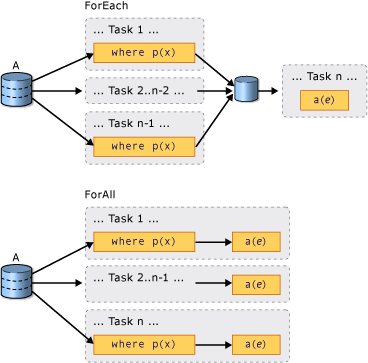
In sequential LINQ queries, execution is deferred until the query is enumerated either in a foreach (For Each in Visual Basic) loop or by invoking a method such as System.Linq.ParallelEnumerable.ToList , System.Linq.ParallelEnumerable.ToArray , or System.Linq.ParallelEnumerable.ToDictionary. In PLINQ, you can also use foreach to execute the query and iterate through the results. However, foreach itself does not run in parallel, and therefore, it requires that the output from all parallel tasks be merged back into the thread on which the loop is running. In PLINQ, you can use foreach when you must preserve the final ordering of the query results, and also whenever you are processing the results in a serial manner, for example when you are calling Console.WriteLine for each element. For faster query execution when order preservation is not required and when the processing of the results can itself be parallelized, use the System.Linq.ParallelEnumerable.ForAll method to execute a PLINQ query. System.Linq.ParallelEnumerable.ForAll does not perform this final merge step. The following code example shows how to use the System.Linq.ParallelEnumerable.ForAll method. System.Collections.Concurrent.ConcurrentBag is used here because it is optimized for multiple threads adding concurrently without attempting to remove any items.
sample · csharpsamples/snippets/csharp/VS_Snippets_Misc/plinq/cs/plinq2_cs.cs4
using System;
using System.Collections.Concurrent;
using System.Collections.Generic;
using System.Linq;

class Example
{
    public static void Main()
    {
        IntroTopic_OptInModel();
        IntroTopic_OptIntoOrdering();
        ForAllOperator();
        CustomPartitioners();
    }

    static void IntroTopic_OptInModel()
    {
        // <snippet1>
        var source = Enumerable.Range(1, 10000);

        // Opt in to PLINQ with AsParallel.
        var evenNums = from num in source.AsParallel()
                       where num % 2 == 0
                       select num;
        Console.WriteLine($"{evenNums.Count()} even numbers out of {source.Count()} total");
        // The example displays the following output:
        //       5000 even numbers out of 10000 total
        // </snippet1>
    }

    static int Compute(int i)
    {
        return 1;
    }

    static void IntroTopic_OptIntoOrdering()
    {
        var numbers = Enumerable.Range(0, 1000);
        // <snippet3>
        var evenNums =
            from num in numbers.AsParallel().AsOrdered()
            where num % 2 == 0
            select num;
        // </snippet3>
    }

    static void ForAllOperator()
    {
        var concurrentBag = new ConcurrentBag<int>();

        // <snippet4>
        var nums = Enumerable.Range(10, 10000);
        var query =
            from num in nums.AsParallel()
            where num % 10 == 0
            select num;

        // Process the results as each thread completes
        // and add them to a System.Collections.Concurrent.ConcurrentBag(Of Int)
        // which can safely accept concurrent add operations
        query.ForAll(e => concurrentBag.Add(Compute(e)));
        // </snippet4>
    }

    static void CustomPartitioners()
    {
        // <Snippet2>
        int[] arr = new int[9999];
        Partitioner<int> partitioner = new MyArrayPartitioner<int>(arr);
        var query = partitioner.AsParallel().Select(SomeFunction);
        // </Snippet2>
    }

    public static int SomeFunction(int x)
    {
        return x * x;
    }
}

class MyArrayPartitioner<T> : Partitioner<T>
{
    private readonly List<T> _list = new();

    public MyArrayPartitioner(T[] arr)
    {
        foreach (var element in arr)
        {
            _list.Add(element);
        }
    }

    public override IList<IEnumerator<T>> GetPartitions(int partitionCount)
    {
        List<IEnumerator<T>> enumList = new();
        enumList.Add(_list.GetEnumerator());
        return enumList;
    }
}
sample · vbsamples/snippets/visualbasic/VS_Snippets_Misc/plinq/vb/plinq2_vb.vb4
Imports System.Collections.Concurrent

Module Module1

    Sub IntroTopic_OptInModel()

        '<snippet1>
        Dim source = Enumerable.Range(1, 10000)

        ' Opt in to PLINQ with AsParallel
        Dim evenNums = From num In source.AsParallel()
                       Where num Mod 2 = 0
                       Select num
        Console.WriteLine("{0} even numbers out of {1} total",
                          evenNums.Count(), source.Count())
        ' The example displays the following output:
        '       5000 even numbers out of 10000 total
        ' </snippet1>

    End Sub

    Function Compute(ByVal i As Integer) As Double
        Return 1.0
    End Function
    Function ProcessWithSideEffects(ByVal i As Integer) As Double
        Return 1.0
    End Function

    Sub IntroTopic_DOP()
        Dim source = Enumerable.Range(1, 10000)
        '<snippet5>
        Dim query = From item In source.AsParallel().WithDegreeOfParallelism(2)
                    Where Compute(item) > 42
                    Select item
        '</snippet5>
    End Sub

    Sub IntroTopic_OptIntoOrdering()

        Dim numbers = Enumerable.Range(0, 1000)
        '<snippet3>
        Dim evenNums = From num In numbers.AsParallel().AsOrdered()
                       Where num Mod 2 = 0
                       Select num


        '</snippet3>
    End Sub

    Sub ForAllOperator()

        Dim concurrentBag As New ConcurrentBag(Of Integer)

        '<snippet4>
        Dim nums = Enumerable.Range(10, 10000)
        Dim query = From num In nums.AsParallel()
                    Where num Mod 10 = 0
                    Select num

        ' Process the results as each thread completes
        ' and add them to a System.Collections.Concurrent.ConcurrentBag(Of Int)
        ' which can safely accept concurrent add operations
        query.ForAll(Sub(e) concurrentBag.Add(Compute(e)))
        '</snippet4>
    End Sub

    Sub OrderPreservation()
        Dim cities() = {New City}
        Dim people() = {New Person}

        'Order Preservation In PLINQ 1st snippet
        '<snippet8>
        Dim cityQuery = From city In cities.AsParallel()
                        Where city.Population > 10000
                        Take (1000)
        '</snippet8>


        'Order Preservation In PLINQ 2nd snippet
        '<snippet9>
        Dim orderedCities = From city In cities.AsParallel().AsOrdered()
                            Where city.Population > 10000
                            Take (1000)
        '</snippet9>

        '<snippet6>
        Dim orderedCities2 = From city In cities.AsParallel().AsOrdered()
                             Where city.Population > 10000
                             Select city
                             Take (1000)

        Dim finalResult = From city In orderedCities2.AsUnordered()
                          Join p In people.AsParallel() On city.Name Equals p.CityName
                          Select New With {.Name = city.Name, .Pop = city.Population, .Mayor = city.Mayor}

        For Each city In finalResult
            Console.WriteLine(city.Name & ":" & city.Pop & ":" & city.Mayor)
        Next

        '</snippet6>

        '<snippet7>
        Dim orderedCities3 = From city In cities.AsParallel()
                             Where city.Population > 10000
                             Order By city.Name
                             Take (1000)
        '</snippet7>

    End Sub
    Class City
        Public Name As String
        Public Population As Integer
        Public Mayor As String
    End Class

    Class Person
        Public Name As String
        Public CityName As String
    End Class

    Class Customer
        Public Orders() As Order
    End Class

    Class Order
        Public amount As Double
        Public OrderDate As DateTime
    End Class


    Function ExpensiveFunc(ByVal I As Integer) As Double 'dummy
        Return 1.0
    End Function

    Sub MergeOptions()
        Dim nums = Enumerable.Range(0, 1000)
        '<snippet26>
        Dim scanlines = From n In nums.AsParallel().WithMergeOptions(ParallelMergeOptions.NotBuffered)
                        Where n Mod 2 = 0
                        Select ExpensiveFunc(n)

        '</snippet26>
    End Sub

    Sub OverParallelization()
        Dim customers() = {New Customer}
        Dim aDate = DateTime.Now
        '<snippet20>
        Dim q = From cust In customers.AsParallel()
                From order In cust.Orders.AsParallel()
                Where order.OrderDate > aDate
                Select New With {cust, order}

        '</snippet20>
    End Sub

    '<snippet23>
    Class MergeOptions2
        Sub DoMergeOptions()

            Dim nums = Enumerable.Range(1, 10000)

            ' Replace NotBuffered with AutoBuffered
            ' or FullyBuffered to compare behavior.
            Dim scanLines = From n In nums.AsParallel().WithMergeOptions(ParallelMergeOptions.NotBuffered)
                            Where n Mod 2 = 0
                            Select ExpensiveFunc(n)

            Dim sw = Stopwatch.StartNew()
            For Each line In scanLines
                Console.WriteLine(line)
            Next

            Console.WriteLine("Elapsed time: {0} ms. Press any key to exit.")
            Console.ReadKey()

        End Sub
        ' A function that demonstrates what a fly
        ' sees when it watches television :-)
        Function ExpensiveFunc(ByVal i As Integer) As String
            Threading.Thread.SpinWait(2000000)
            Return String.Format("{0} *****************************************", i)
        End Function
    End Class
    '</snippet23>
End Module
The following illustration shows the difference between foreach and System.Linq.ParallelEnumerable.ForAll with regard to query execution.
Cancellation
PLINQ is integrated with the cancellation types in .NET. (For more information, see Cancellation in Managed Threads.) Therefore, unlike sequential LINQ to Objects queries, PLINQ queries can be canceled. To create a cancelable PLINQ query, use the System.Linq.ParallelEnumerable.WithCancellation operator on the query and provide a System.Threading.CancellationToken instance as the argument. When the System.Threading.CancellationToken.IsCancellationRequested property on the token is set to true, PLINQ will notice it, stop processing on all threads, and throw an System.OperationCanceledException.
It is possible that a PLINQ query might continue to process some elements after the cancellation token is set.
For greater responsiveness, you can also respond to cancellation requests in long-running user delegates. For more information, see How to: Cancel a PLINQ Query.
Exceptions
When a PLINQ query executes, multiple exceptions might be thrown from different threads simultaneously. Also, the code to handle the exception might be on a different thread than the code that threw the exception. PLINQ uses the System.AggregateException type to encapsulate all the exceptions that were thrown by a query, and marshal those exceptions back to the calling thread. On the calling thread, only one try-catch block is required. However, you can iterate through all of the exceptions that are encapsulated in the System.AggregateException and catch any that you can safely recover from. In rare cases, some exceptions may be thrown that are not wrapped in an System.AggregateException, and System.Threading.ThreadAbortExceptions are also not wrapped.
When exceptions are allowed to bubble up back to the joining thread, then it is possible that a query may continue to process some items after the exception is raised.
For more information, see How to: Handle Exceptions in a PLINQ Query.
Custom Partitioners
In some cases, you can improve query performance by writing a custom partitioner that takes advantage of some characteristic of the source data. In the query, the custom partitioner itself is the enumerable object that is queried.
sample · csharpsamples/snippets/csharp/VS_Snippets_Misc/plinq/cs/plinq2_cs.cs2
using System;
using System.Collections.Concurrent;
using System.Collections.Generic;
using System.Linq;

class Example
{
    public static void Main()
    {
        IntroTopic_OptInModel();
        IntroTopic_OptIntoOrdering();
        ForAllOperator();
        CustomPartitioners();
    }

    static void IntroTopic_OptInModel()
    {
        // <snippet1>
        var source = Enumerable.Range(1, 10000);

        // Opt in to PLINQ with AsParallel.
        var evenNums = from num in source.AsParallel()
                       where num % 2 == 0
                       select num;
        Console.WriteLine($"{evenNums.Count()} even numbers out of {source.Count()} total");
        // The example displays the following output:
        //       5000 even numbers out of 10000 total
        // </snippet1>
    }

    static int Compute(int i)
    {
        return 1;
    }

    static void IntroTopic_OptIntoOrdering()
    {
        var numbers = Enumerable.Range(0, 1000);
        // <snippet3>
        var evenNums =
            from num in numbers.AsParallel().AsOrdered()
            where num % 2 == 0
            select num;
        // </snippet3>
    }

    static void ForAllOperator()
    {
        var concurrentBag = new ConcurrentBag<int>();

        // <snippet4>
        var nums = Enumerable.Range(10, 10000);
        var query =
            from num in nums.AsParallel()
            where num % 10 == 0
            select num;

        // Process the results as each thread completes
        // and add them to a System.Collections.Concurrent.ConcurrentBag(Of Int)
        // which can safely accept concurrent add operations
        query.ForAll(e => concurrentBag.Add(Compute(e)));
        // </snippet4>
    }

    static void CustomPartitioners()
    {
        // <Snippet2>
        int[] arr = new int[9999];
        Partitioner<int> partitioner = new MyArrayPartitioner<int>(arr);
        var query = partitioner.AsParallel().Select(SomeFunction);
        // </Snippet2>
    }

    public static int SomeFunction(int x)
    {
        return x * x;
    }
}

class MyArrayPartitioner<T> : Partitioner<T>
{
    private readonly List<T> _list = new();

    public MyArrayPartitioner(T[] arr)
    {
        foreach (var element in arr)
        {
            _list.Add(element);
        }
    }

    public override IList<IEnumerator<T>> GetPartitions(int partitionCount)
    {
        List<IEnumerator<T>> enumList = new();
        enumList.Add(_list.GetEnumerator());
        return enumList;
    }
}
sample · vbsamples/snippets/visualbasic/VS_Snippets_Misc/plinq/vb/plinq3.vb2
Option Strict On
Imports System.Collections.Concurrent

Module Example
    Public Sub Main()
        ' <Snippet2>
        Dim arr(10000) As Integer
        Dim partitioner As Partitioner(Of Integer) = New MyArrayPartitioner(Of Integer)(arr)
        Dim query = partitioner.AsParallel().Select(Function(x) SomeFunction(x))
        ' </Snippet2>
    End Sub

    Public Function SomeFunction(x As Integer) As Integer
        Return x * x
    End Function
End Module

Public Class MyArrayPartitioner(Of T) : Inherits Partitioner(Of T)
    Private list As List(Of T) = New List(Of T)()

    Public Sub New(arr As T())
        For Each element in arr
            list.Add(element)
        Next
    End Sub

    Public Overrides Function GetPartitions(partitionCount As Integer) As IList(Of IEnumerator(Of T))
        Dim enumList = new List(Of IEnumerator(Of T))()
        enumList.Add(list.GetEnumerator())
        Return enumList
    End Function
End Class
PLINQ supports a fixed number of partitions (although data may be dynamically reassigned to those partitions during runtime for load balancing.). System.Threading.Tasks.Parallel.For and System.Threading.Tasks.Parallel.ForEach support only dynamic partitioning, which means that the number of partitions changes at runtime. For more information, see Custom Partitioners for PLINQ and TPL.
Measuring PLINQ Performance
In many cases, a query can be parallelized, but the overhead of setting up the parallel query outweighs the performance benefit gained. If a query does not perform much computation or if the data source is small, a PLINQ query may be slower than a sequential LINQ to Objects query. You can use the Parallel Performance Analyzer in Visual Studio Team Server to compare the performance of various queries, to locate processing bottlenecks, and to determine whether your query is running in parallel or sequentially. For more information, see Concurrency Visualizer and How to: Measure PLINQ Query Performance.